
If you're running an accounting firm, law office, or nonprofit, there's a good chance client information lives in too many places at once. A partner keeps notes in Outlook. An administrator tracks deadlines in a spreadsheet. Signed documents sit in a shared drive. Someone else still has a local folder on the office server that nobody wants to touch.
That setup works until it doesn't. A client calls, asks about the last discussion, and the person answering has to search an inbox, a network folder, and a paper file just to piece together what happened. The cost isn't only time. It's inconsistent service, missed handoffs, weak audit trails, and a constant sense that the firm is one staff change away from losing important context.
For professional services firms, client management software solves a very specific operational problem. It replaces fragmented records with one system where client details, communications, tasks, and documents can live together. That shift sounds simple, but in practice it changes how the firm works every day.
When firms stay on scattered tools, they create hidden failure points:
A proper client management platform creates a shared operating record. Everyone sees the same client timeline, the same open tasks, and the same related files. That matters even more in firms where work moves between intake, delivery, review, billing, and follow-up.
The broader market tells the same story. The CRM software market was estimated at USD 84.6 billion in 2024 and is projected to reach about USD 248.2 billion by 2033, while cloud-based deployment accounted for more than 58.3% of the market, according to Market.us CRM market coverage. For firms choosing systems today, that isn't just a technology trend. It's evidence that relationship and client operations software has become core business infrastructure.
For accounting leaders comparing broader firm systems, the Accountancy practice software 2026 guide is useful because it frames software choices around workflow, compliance, and day-to-day delivery, not just product demos.
If your current process still depends on desktop folders and disconnected file shares, hosted document access usually becomes part of the fix, not a separate project. A move toward cloud document management for business operations often closes the gap between client records and the files attached to them.
Practical rule: If your team has to ask where something is, the system isn't doing its job.
A partner asks for the latest engagement note before a client call. The manager has one version in email, billing has another in the practice system, and the file team has a separate copy on a shared drive. That delay is not a minor inconvenience. In an accounting firm, law office, or nonprofit, it creates billing mistakes, missed follow-ups, and avoidable risk.
Client management software sits at the center of that problem. In a professional services firm, it is the operating layer for client relationships, active work, and internal accountability. The point is not to store more information. The point is to keep the right people working from the same record, with clear ownership and a traceable history.
A useful system holds the full working context of a client relationship in one place. Staff should be able to open a record and see who the client is, what services are active, what happened last, what is waiting, and what deadline comes next. That matters more in firms where work passes through intake, review, partner approval, billing, and follow-up.
In practice, the software usually needs to manage four connected areas:
That is why firms outgrow basic contact tools. They do not need a better address book. They need a system that controls handoffs and shows where work stands.
A spreadsheet can track names. A shared inbox can hold messages. A desktop folder can store files. None of those tools gives a firm reliable process control, especially once multiple staff members touch the same client.
The break point usually shows up during growth or staff turnover. One person knows that a nonprofit funder requires extra approval steps. Another knows that a business client has three related entities and separate billing contacts. A senior accountant remembers that a tax return is waiting on one missing document. If that knowledge lives in personal habits instead of the system, service quality depends too much on memory.
That is a weak operating model.
For accounting firms sorting out how client management should fit with broader workflow and service delivery, this guide to the best CRM for accounting firms gives a practical comparison of where CRM ends and firm operations begin.
The firms that get value from client management software make a few disciplined choices early.
The trade-off is straightforward. More structure takes effort at implementation. Staff have to use required fields, follow stage definitions, and work inside a shared process. In return, the firm gets cleaner handoffs, better audit trails, fewer missed tasks, and less dependence on individual memory.
That is what turns client management software from a recordkeeping tool into core infrastructure.
A firm feels the difference in software quality on a busy Tuesday afternoon. A client calls asking about a filing, the partner wants status before a meeting, billing needs the latest time entry, and an admin is chasing one missing document. If those answers live in separate systems, staff spend the hour hunting. If the platform is configured well, they open one record and keep work moving.
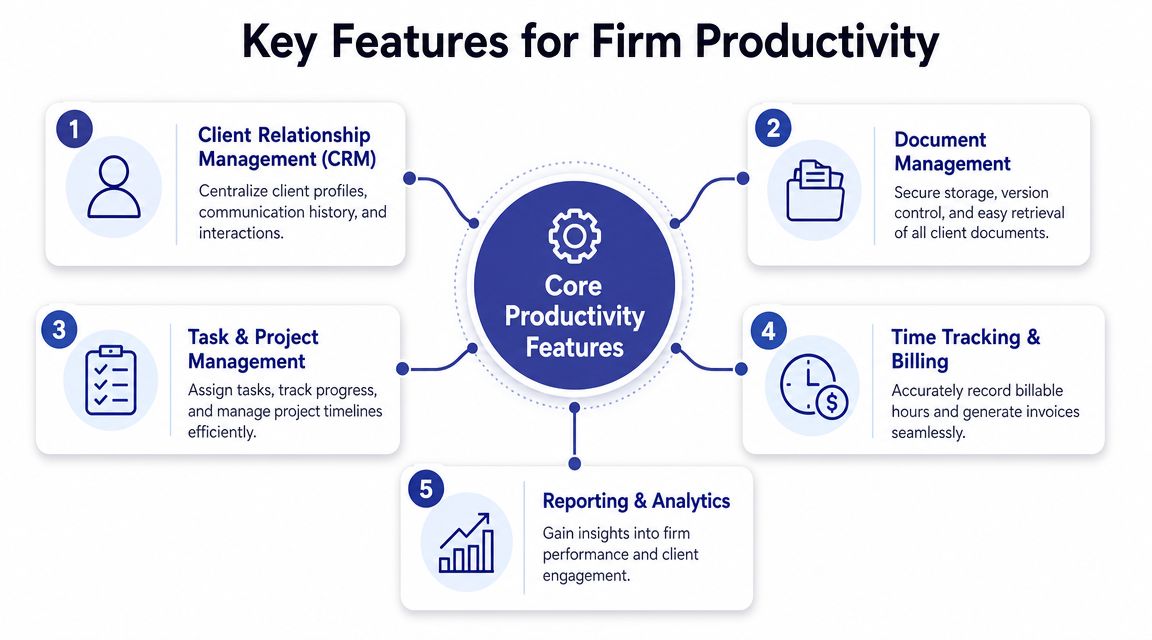
The client record needs to reflect how a professional services firm serves clients. Basic contact data is only the starting point. Firms also need relationship history, open matters or projects, assigned staff, related entities, deadlines, service notes, and documents tied to the specific engagement.
The details differ by firm type. Nonprofits may need to connect funders, board contacts, program records, and grant reporting dates. Law firms often need matter-level records, conflict-related details, opposing counsel, and linked correspondence. Accounting firms usually care about entity structure, filing calendars, open requests, return status, and recurring compliance work.
That structure saves time, but it also reduces risk. Staff stop relying on inbox memory or private spreadsheets. New team members can step into an account without rebuilding the story from old emails.
Productivity usually breaks down in handoffs, not in strategy. Intake gets started, but nobody assigns the review. A document arrives, but the next step sits in someone's inbox. A deadline is known, but no reminder is tied to the client file.
Good workflow tools fix that by attaching tasks to events inside the record. The practical patterns are familiar:
The trade-off is real. Automation saves labor only after the firm defines stages, owners, and exceptions with discipline. Firms that skip that work usually end up paying for features they never use.
To place these workflow features in the broader operating model of a service firm, compare them with practice management software for professional services firms.
A short walkthrough can make those feature categories easier to picture in a live platform:
Many firms buy a client management system and still keep essential client work somewhere else. Signed engagement letters sit in shared drives. Financial files are stored under inconsistent names. Staff track status in email threads because the system record is incomplete. Productivity drops fast when the official system is not the place where work is performed.
The stronger setup ties documents, service activity, billing inputs, and reporting to the same client or matter record. That matters even more in accounting, legal, and nonprofit environments, where staff need clear histories and supportable records for reviews, audits, and internal oversight.
Three feature groups usually separate a system that gets adopted from one that gets bypassed:
Field test: If billing, service delivery, and administration each maintain a different version of client status, the firm is paying for avoidable coordination.
The best fit is rarely the system with the longest feature list. It is the one that keeps client information, work in progress, and operational accountability in one hosted environment that staff will use every day.
Once a firm decides it needs client management software, the next question is where that software should live. For many professional services teams, this decision gets framed as technology. It's really an operating model choice.
An on-premise setup gives the firm direct control over servers, local storage, updates, and access policies. A cloud-hosted setup shifts infrastructure, maintenance, and remote delivery into a hosted environment. Both can work. They impose very different burdens.
On-premise systems usually appeal to firms that are used to local servers and custom desktop applications. The trade-off is that the firm also inherits hardware refresh cycles, backup responsibility, patching, remote access setup, and recovery planning.
Cloud-hosted systems reduce that infrastructure burden. They also align with where the market has already moved. For firms that need flexible access, distributed staffing, and less dependence on office-based servers, the hosted model tends to fit current operating needs better than a server closet in one location.
The comparison below is the one I use in real selection conversations.
| Factor | On-Premise | Cloud-Hosted |
|---|---|---|
| Upfront cost | Higher initial investment in servers, setup, and related IT work | Lower initial infrastructure burden, usually operationalized as ongoing service cost |
| Maintenance | Internal staff or outside IT handles updates, backups, troubleshooting, and hardware issues | Hosting provider manages infrastructure, patching cadence, and platform availability |
| Remote access | Often requires added remote access tools and more administration | Designed for access from different locations and devices |
| Scalability | Capacity planning can be slow and hardware-bound | Easier to adjust for staff changes, storage growth, or seasonal workloads |
| Security operations | The firm is responsible for enforcing controls consistently | Strong option when the hosting environment is built with managed security controls |
| Downtime response | Recovery depends on internal readiness and local failover planning | Support and infrastructure monitoring are usually built into the service model |
The common mistake is comparing license price without comparing operating overhead. A lower-cost server-based tool can become expensive once you add IT support, maintenance time, remote access friction, and backup responsibility.
Another mistake is assuming cloud means less control. In practice, many firms gain better operational discipline in a hosted model because permissions, backups, monitoring, and access policies become more standardized.
For firms evaluating the trade-offs in detail, this cloud vs on-premise comparison for business systems is a useful technical and operational reference.
Firms rarely regret moving away from aging servers. They do regret underestimating the cleanup and process work required before migration.
A hosted model won't fix broken processes on its own. It does remove a class of infrastructure problems that distract firms from client work. For accountants, attorneys, and nonprofit teams that need secure access outside one office, that's often the turning point.
The strongest argument for cloud isn't novelty. It's that most firms need reliability, accessibility, and manageable administration more than they need to own hardware.
In professional services, software selection is a risk decision as much as an operations decision. Accounting records, legal files, donor information, case notes, and financial documents carry confidentiality obligations that don't disappear because the interface looks modern.

A secure client management environment needs more than a login screen. The important controls are the ones staff encounter every day and the ones administrators can verify later.
Focus on these areas during evaluation:
Those controls are practical, not theoretical. When a partner asks who changed a file, when an auditor reviews a process, or when a staff member leaves, the system needs answers.
A newer issue is AI-readiness. Many vendors now highlight AI search, summarization, and automation. That's useful only if the underlying records are governed properly.
The sharper buying question isn't whether the software has AI. It's whether the data inside it is organized, permissioned, and auditable enough to use AI safely. According to Digital Leadership's discussion of underserved customer needs in AI governance, 65% of organizations reported regular use of generative AI in 2024, up from 33% in 2023, which raises the stakes for governance, access controls, and auditability.
Governance check: If an AI tool can summarize client data, you need to know exactly which records it can reach and why.
For firms tightening cloud controls around access, authentication, and operational safeguards, this checklist of essential cloud security practices for businesses is a practical place to start.
Many firms ask vendors about encryption and stop there. That isn't enough. The more revealing questions are operational:
Security isn't only about breach prevention. It's also about proving that the firm handled sensitive information with discipline.
A bad software decision usually shows up six months later. Staff keep working from inboxes, spreadsheets, and local folders because the new system does not fit how the firm delivers work. Licenses get renewed anyway, and leadership is left wondering why efficiency never improved.
Professional services firms should evaluate client management software against daily operating reality. That means matter flow, document handling, billing steps, staffing changes, approval points, and client confidentiality requirements. In accounting, law, and nonprofit environments, software that looks strong in a demo can still fail if it cannot support controlled workflows in a hosted environment with the right access rules.
Map the full client lifecycle before narrowing the vendor list. For an accounting firm, that may run from lead intake and document collection through engagement setup, preparation, review, billing, and renewal. For a law firm, it often starts with intake and conflict checks, then moves through matter opening, document management, deadlines, billing, and file closure. For a nonprofit, the process may include intake, eligibility review, service delivery, funding records, and reporting obligations.
Then pressure-test each system against the work itself.
Feature count is rarely the deciding factor. In practice, firms get better results from software that cuts administrative friction, supports recurring workflows, and keeps records consistent across teams.
ROI usually starts with labor, risk, and continuity.
Some returns are easy to quantify. If administrators stop entering the same client data into multiple systems, that time can be priced directly. If billing teams can see completed work and supporting notes in one place, invoice capture often improves. If onboarding moves faster because intake, documents, and approvals are tracked in one system, work begins sooner.
Other returns matter just as much, even if they do not sit neatly in a spreadsheet. Fewer missed handoffs. Less time spent asking for status updates. Lower exposure to errors caused by outdated files or unclear ownership. Better continuity when someone is out or leaves the firm.
A practical ROI review should look at:
This is also where firms should accurately account for deployment costs. On-premise software may look cheaper if you only compare subscription fees, but that ignores server maintenance, backup management, remote access workarounds, upgrade projects, and downtime risk. Hosted cloud delivery often shifts costs into a more predictable operating model while reducing the internal effort required to keep the system available and current.
In professional services, software ROI often appears first in cleaner handoffs, fewer exceptions, and less rework.
Run the demo using your firm's process, not the vendor's script. Give the sales team a sample workflow and ask them to complete it from intake to completion.
Use scenarios that expose operational friction:
Watch what happens when the process gets messy. Can the system handle exceptions without manual side tracking? Can supervisors see status without asking staff for updates? Can permissions be adjusted cleanly when responsibility changes? Those details matter more than polished dashboards.
I usually advise firms to score demos in three categories. Fit to workflow. Security and access control. Total cost to run. A product can score well on features and still be the wrong choice if it requires too much local support, too much custom administration, or too many workarounds for confidential client work.
Good software should reduce operational drag. Good deployment should reduce technical drag. For many firms, the strongest return comes from combining both in a secure hosted environment that centralizes client work without adding more infrastructure to manage.
A firm usually reaches this point after one too many avoidable failures. Someone cannot access a client file from home before a deadline. A server update breaks a line-of-business application. A partner asks who approved access to a restricted matter, and no one can answer quickly. The problem is no longer software alone. It is the way that software is delivered, secured, and maintained.
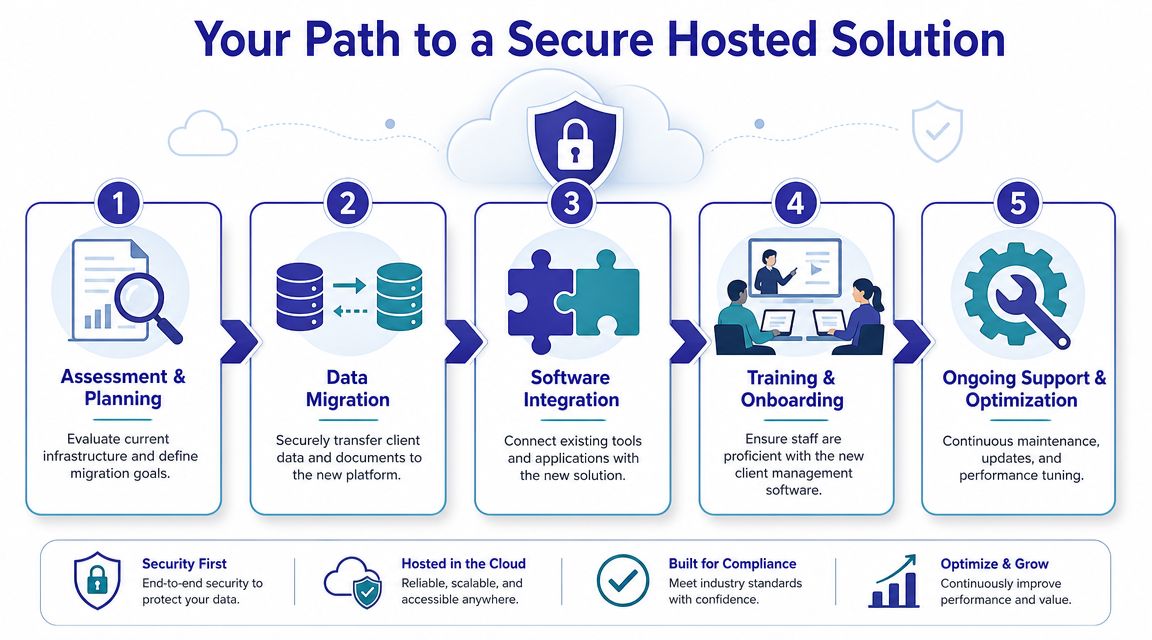
The strongest path is usually a controlled move from scattered local systems to a hosted environment that keeps the applications your firm depends on, while reducing the operational risk around them.
Start with an inventory that reflects how the firm works. Identify where client records live, which applications are still tied to key workflows, which document stores contain active files, and which remote access methods staff use when they are outside the office.
This review often surfaces a pattern common in accounting firms, law offices, and nonprofits. The risk sits between systems. One application holds client data, another stores documents, a local server runs the database, and remote staff rely on a VPN or desktop shortcut that only one IT person understands. That setup creates delays, weakens oversight, and makes compliance reviews harder than they should be.
Migration work should start with cleanup. Remove duplicate folders, archive stale records, confirm naming standards, and map access rights before anything moves. If restricted nonprofit records, legal matter files, or financial documents already have inconsistent permissions, a hosted rollout is the right time to fix that.
Validation matters more than speed. Test user access by role. Confirm document paths. Check integrations and audit trails after transfer. A rushed cutover only relocates old confusion into a new system, and firms usually pay for that later through rework, support tickets, and exception handling.
Hosted software performs well when the surrounding process is clear. That means aligning email, document management, practice-specific applications, and approval steps so staff are not forced back into side folders and manual tracking.
Training should match the firm's real work. Use an intake for a new client with missing documents. Reassign a matter midway through review. Restrict access to a board file while preserving reporting visibility for leadership. If staff can complete those tasks without asking where files went or who owns the next step, the rollout is on solid ground.
For many professional services firms, hosted delivery is the practical middle ground. The firm keeps the software that supports billable work and client service, but sheds the burden of maintaining office servers, patching remote access tools, and troubleshooting every workstation issue internally. That shift usually improves consistency as much as convenience.
A secure hosted model works best when it is treated as an operating decision, not just an IT project. Firms that plan the move carefully tend to get a cleaner environment, tighter access control, and fewer interruptions to client work.




