Choosing the right tools for your practice is critical for efficiency and accuracy, and finding the best software for tax professionals can feel like searching for a needle in a haystack. The market is saturated with options, each promising superior features and seamless workflows. This guide cuts through the marketing noise to give you a clear, actionable playbook for selecting the ideal tax preparation software for your firm's specific needs.
Whether you're a solo practitioner, part of a large accounting firm, or manage a small business's finances, the right platform can make all the difference during tax season. This resource provides a detailed analysis of the industry's top contenders, moving beyond generic feature lists. We will examine each software's ideal user profile, key capabilities, pricing structures, and practical pros and cons. You'll find direct links and screenshots for every option, helping you visualize how it fits into your daily operations.
We will also explore crucial implementation factors, such as cloud hosting versus on-premise solutions and security protocols, including how a secure cloud platform can host desktop applications like Lacerte or Drake Tax. Furthermore, as you evaluate tax technology, consider how complementary tools can support your firm. For example, an advanced AI legal software can help with complex legal research and document drafting, improving overall productivity. This curated list is designed to be your definitive resource for making an informed decision, equipping you with the insights needed to select a platform that truly works for you.
Cloudvara offers a distinct and powerful solution for tax and accounting firms looking to modernize their infrastructure without abandoning their essential desktop software. Rather than being a tax application itself, Cloudvara is a specialized cloud hosting provider that moves your firm’s entire suite of licensed desktop programs-including QuickBooks, Sage, Microsoft Office, and professional tax preparation software-onto a secure, dedicated server. This approach provides the flexibility of remote access from any device while preserving the familiar workflows your team relies on, making it a standout choice among the best software for tax professionals who need to bridge the gap between legacy systems and modern work demands.

The platform is engineered to directly address the IT challenges faced by small and mid-sized practices. It eliminates the cost and maintenance burden of in-house servers, replacing them with a fully managed environment backed by a 99.5% uptime guarantee. For firms without dedicated IT staff, this service is a game-changer. Key security and business continuity features are built-in, including automated daily backups, two-factor authentication, and enterprise-grade physical security at the data center.
What sets Cloudvara apart is its high-touch, personalized support model. Each client is assigned a dedicated "cloud IT advocate" who provides immediate, 24/7 assistance. This direct line of communication, praised in numerous client testimonials, ensures that technical issues are resolved quickly, minimizing downtime during critical periods like tax season. This model contrasts sharply with the often impersonal, ticket-based support systems of larger providers. For firms wanting to learn more about hosting specific applications, Cloudvara provides detailed guides on cloud-based tax software and its benefits.
Cloudvara prioritizes a low-friction adoption process. It offers a free 15-day trial with no credit card required, allowing firms to test the environment with their actual software and data. While specific pricing is not published on the website-requiring a direct sales inquiry for a custom quote-the company emphasizes transparent costs and provides an intuitive billing portal for clients. This approach ensures pricing is tailored to your firm’s specific application and user needs.
| Feature | Details |
|---|---|
| Primary Use Case | Hosting licensed desktop tax, accounting, and office software in a secure cloud for remote access. Ideal for firms retiring on-premise servers but keeping existing software. |
| Key Strength | Personalized 24/7 Support: Direct access to a named cloud IT advocate for immediate issue resolution, a significant advantage for firms without internal IT. |
| Business Continuity | Automated daily backups, secure off-site data centers, and a 99.5% uptime guarantee ensure data safety and accessibility. |
| Trial & Onboarding | Free 15-day trial (no credit card, no contract) with hands-on migration support to ensure a smooth transition. |
| Target Audience | Small to mid-sized accounting firms, CPAs, law offices, and nonprofits that depend on desktop applications like QuickBooks, Sage, Lacerte, or Drake Tax. |
| Security Considerations | While core security features are robust, firms with strict regulatory needs (e.g., HIPAA, SOC 2) should verify specific compliance certifications during the sales process as they are not publicly listed on the site. |
For firms seeking a true cloud-native solution, Intuit ProConnect Tax Online stands out as one of the best software options for tax professionals who prioritize accessibility and ecosystem integration. Unlike desktop software that requires hosting, this platform is entirely browser-based, allowing you and your team to prepare 1040 and business returns from any device with an internet connection. This makes it a prime choice for practices with remote staff or those aiming to eliminate server maintenance.
The platform’s strength lies in its deep integration with the Intuit ecosystem. You can directly import data from QuickBooks Online Accountant, saving significant data entry time. Client collaboration is managed through Intuit Link, a secure portal for document exchange, while Intuit eSignature is built-in to expedite the signing process. These features create a cohesive workflow from client onboarding to filing.
Key Takeaway: ProConnect's pay-per-return model is ideal for firms with fluctuating seasonal volume or those just starting out. It allows you to pay only for what you use, avoiding a large upfront investment.
However, the pricing structure can become a drawback for high-volume firms. While the per-return cost decreases with volume purchases, it can ultimately be more expensive than unlimited desktop licenses. Additionally, Intuit charges a separate annual "User Access" fee for each team member, which must be factored into your budget.
Recommended Use Case:
Website: Intuit ProConnect Tax Online
For CPA firms that handle complex, high-net-worth individual and business returns, Intuit Lacerte is a powerful desktop-based suite. It is widely considered some of the best software for tax professionals because of its deep diagnostic tools and extensive forms library, which are critical for navigating intricate tax scenarios. Its mature workflow is built for multi-preparer teams, with robust review processes and K-1 batch delivery tools to manage partnership and S-corp returns efficiently.

While Lacerte is a desktop-first application, its functionality can be extended to the cloud. Many firms opt for third-party hosting to gain remote access and remove the need for on-premise server management. For firms curious about this approach, you can learn more about the benefits and features of Lacerte hosting. This setup combines the power of the desktop software with the accessibility of a cloud solution.
Key Takeaway: Lacerte excels with its comprehensive diagnostic checks, catching potential errors and omissions that other software might miss, making it invaluable during review.
The main consideration is its premium positioning. Pricing is quote-based and generally higher than other options, reflecting its focus on complex returns. The desktop-native design also means that achieving cloud access requires an additional investment in hosting, which adds another layer of cost and technical management compared to a fully browser-based program.
Recommended Use Case:
Website: Intuit Lacerte
Intuit ProSeries offers a powerful desktop-based solution that strikes a balance between comprehensive features and user-friendliness, making it one of the best software for tax professionals who prefer a forms-driven workflow. It is often seen as a more approachable alternative to Lacerte, with a gentler learning curve. ProSeries is available in different tiered packages, including ProSeries Basic for 1040-only practices and ProSeries Professional, which expands to cover a full suite of business, gift, and estate returns.

This desktop-first design can be a significant limitation for firms needing remote access. However, this is easily solved by moving the software to a secure cloud environment. By using a specialized service, firms can gain anytime, anywhere access without sacrificing the robust features of the desktop program. This approach combines the power of ProSeries with the flexibility of a cloud solution. To understand this better, explore the benefits of ProSeries hosting for tax professionals. The software also integrates with Intuit Link for client data collection and supports data import from QuickBooks Desktop, helping to reduce manual entry.
Key Takeaway: ProSeries provides a transparent, pay-per-return or unlimited package pricing model that is ideal for firms wanting predictable costs, especially those handling a high volume of 1040s.
A potential downside is that its desktop nature requires management, and accessing its most advanced features for complex business entities might lead some firms to consider its sibling, Lacerte. Still, for its target user, it provides a highly efficient and reliable tax preparation engine.
Recommended Use Case:
Website: Intuit ProSeries
Drake Tax has earned a loyal following among small to mid-sized firms, positioning itself as some of the best software for tax professionals who prioritize value, speed, and dependable support. It is celebrated for its straightforward, heads-down data entry workflow that allows preparers to move through common return types with high efficiency. The software is available in multiple formats, including a traditional desktop version, a pay-per-return model, and a rebranded cloud solution called Drake Tax Online.

While the desktop software is a powerful tool on its own, many firms choose to host it in a private cloud environment. This setup provides the robust functionality and speed of the desktop application with the accessibility of a cloud-based program. For those interested in this approach, a detailed guide on Drake Tax hosting explains how to get the benefits of anywhere access and enhanced security.
Key Takeaway: Drake's all-inclusive pricing for its unlimited desktop package is a major draw. It bundles all federal and state modules for individual and business returns, along with practice management tools, at a single, competitive price point.
The trade-off for this excellent value is a user interface that feels more utilitarian than its more expensive enterprise competitors. While highly functional, it lacks the modern polish of other suites. Furthermore, firms that handle exceptionally complex or niche multinational corporate returns may find the capabilities of top-tier software more suited to their specific needs.
Recommended Use Case:
Website: Drake Tax
For established firms seeking an enterprise-grade solution, Thomson Reuters UltraTax CS is a cornerstone of the professional tax world. As part of the integrated CS Professional Suite, its primary strength is the deep connection with other Thomson Reuters applications like Practice CS, Workpapers CS, and FileCabinet CS. This creates a powerful, single-source ecosystem for firms that handle complex corporate, partnership, and multi-state returns, positioning it as one of the best software for tax professionals standardizing on this platform.

The software provides immense depth, offering comprehensive federal and state form libraries and highly granular diagnostics to catch errors before filing. While UltraTax CS is desktop-based, many firms use a dedicated hosting provider to gain cloud-like accessibility and security without managing their own servers. You can explore the benefits of this approach with UltraTax CS hosting to see if it fits your practice's needs.
Key Takeaway: UltraTax CS is built for depth and integration, not standalone simplicity. It excels when used as the tax component of the wider CS Professional Suite.
The main considerations are cost and complexity. Pricing is quote-based and sits at the premium end of the market, making it less suitable for sole practitioners or small firms with tight budgets. The extensive features also come with a steeper learning curve, requiring significant time for implementation and training.
Recommended Use Case:
Website: Thomson Reuters UltraTax CS
For large CPA firms and corporate tax departments tackling immense complexity, Thomson Reuters GoSystem Tax RS is a premier web-based system. It is purpose-built to manage intricate consolidated returns, multistate filings, and international tax scenarios that would overwhelm standard professional software. Its native cloud architecture provides the processing power and collaborative framework needed for enterprise-scale workflows involving distributed teams.

The platform excels with its robust review process and powerful data import tools, which are critical for high-stakes engagements. Deep integration with the broader Thomson Reuters ecosystem, including Checkpoint research and Onvio firm management tools, creates a unified environment from data collection to final review. This level of functionality makes it one of the best software options for tax professionals in the enterprise space.
Key Takeaway: GoSystem Tax RS is unmatched in its ability to handle complex entity work, particularly for C-corps with multiple subsidiaries and extensive K-1 distribution needs.
However, its enterprise orientation means it is often more than a small firm needs or can afford. The quote-based pricing model, while tailored to the client, typically results in a higher total cost of ownership compared to off-the-shelf software. Its power and scope come with a steeper learning curve and implementation process.
Recommended Use Case:
Website: Thomson Reuters GoSystem Tax RS
For firms seeking a fully integrated, cloud-native ecosystem, Wolters Kluwer CCH Axcess Tax is a premier choice. This platform is the tax preparation engine within the broader CCH Axcess suite, which includes interconnected modules for document management, workflow, and client portals. Its strength lies in creating a centralized, paperless environment where every step of the tax process is managed within a single system, making it one of the best software options for tax professionals in multi-office or remote-first firms.
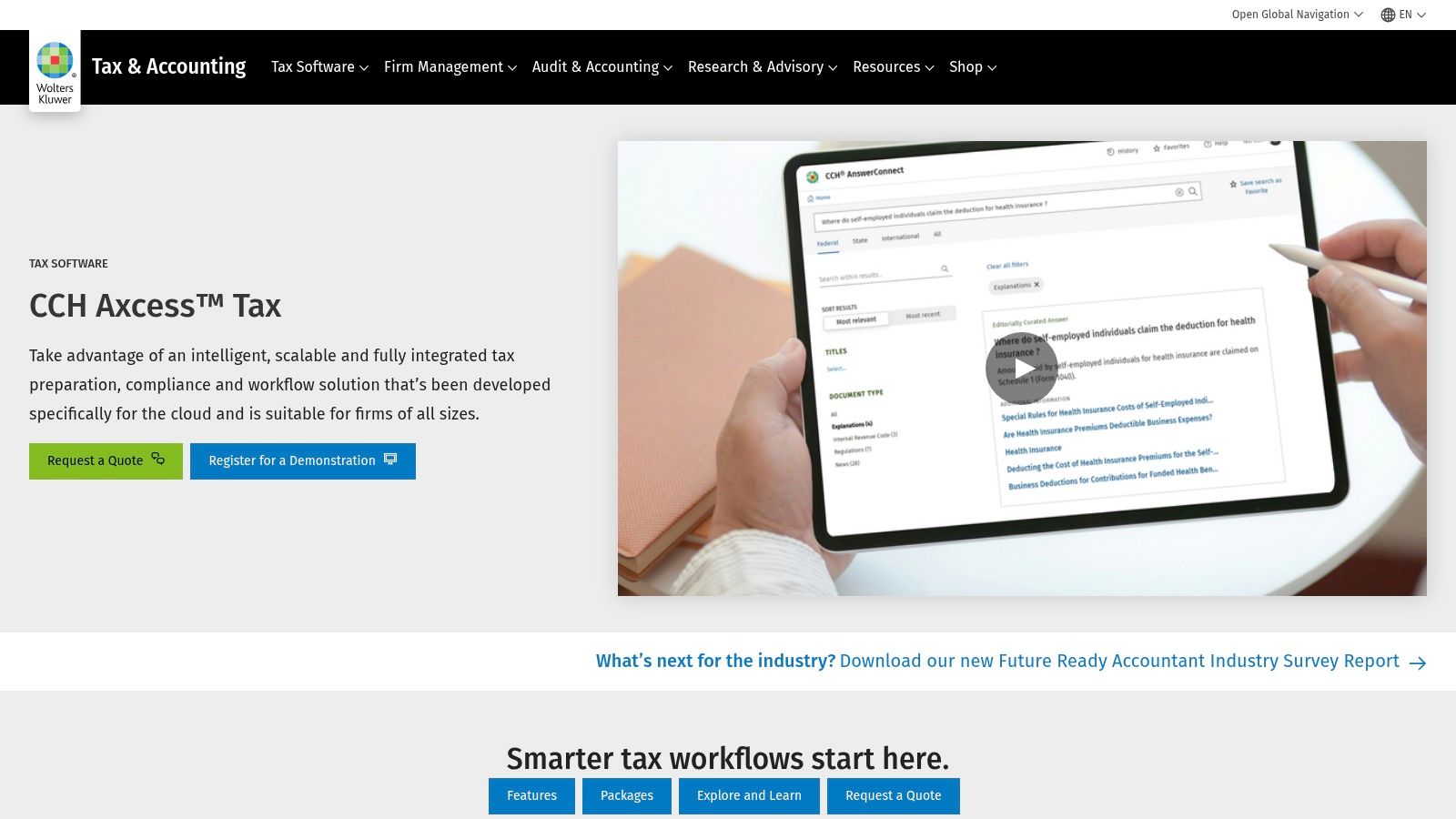
The system is built for complex review cycles and team collaboration. Tax data flows seamlessly between the tax module and other applications like CCH Axcess Workstream for task management and CCH Axcess Document for storage. This tight integration reduces duplicate data entry and provides managers with a clear view of firm-wide productivity. Its powerful diagnostics and extensive forms library handle intricate returns with confidence.
Key Takeaway: CCH Axcess Tax shines in its ability to create a truly end-to-end cloud workflow. The integration with scan-and-import tools and other suite modules is ideal for firms committed to a modern, paperless operation.
However, this robust ecosystem comes at a premium. Pricing is quote-based and generally positioned at the higher end of the market, which can be a barrier for smaller practices. Furthermore, the breadth of the full suite means firms should plan for a significant implementation period and a steeper learning curve compared to standalone tax products.
Recommended Use Case:
Website: Wolters Kluwer CCH Axcess Tax
For large and mid-sized firms that prioritize control and deep functionality, Wolters Kluwer’s CCH ProSystem fx Tax remains a foundational on-premise solution. As the desktop counterpart to CCH Axcess, this platform is engineered for practices handling complex corporate returns, multi-state filings, and high-volume batch processing. Its stability and mature feature set make it a trusted choice for firms that prefer to manage their IT infrastructure locally.
The system’s power is most evident within its integrated suite. ProSystem fx Tax connects directly with other desktop modules like CCH ProSystem fx Document for management and CCH ProSystem fx Engagement for trial balance work. This creates a powerful, self-contained ecosystem for firms that need extensive review tools and efficient processing of calculations, prints, and extensions in large batches. It stands as one of the best software for tax professionals who require robust, proven tools for complex engagements.
Key Takeaway: ProSystem fx Tax's strength is its depth and performance for complex entity work. It is designed for firms that have the IT resources to maintain an on-premise server or are willing to invest in a dedicated hosting environment.
The primary limitation is its desktop-first architecture. Achieving cloud-like accessibility for remote teams requires extra investment and setup, either through your own IT department or a third-party hosting provider like Cloudvara. The quote-based pricing is also complex, with separate costs for different modules and add-ons, which can make budgeting a challenge compared to all-in-one subscription models.
Recommended Use Case:
Website: Wolters Kluwer CCH ProSystem fx Tax
For sole practitioners and smaller firms where budget transparency and value are paramount, TaxAct Professional emerges as one of the best software for tax professionals. Its most distinguishing characteristic is its straightforward, publicly posted pricing, a rarity in an industry often defined by opaque quotes. This allows practices to accurately budget for software costs without sales calls, offering editions for 1040-only preparation or complete bundles that include all business entities.

The platform provides a solid foundation for core tax preparation, including multi-user networking options and included cloud data storage for backups. While it lacks the deep ecosystem integrations and advanced diagnostic tools of enterprise-level suites, it delivers reliable functionality for its target market. Higher-tier bundles include unlimited e-filing, making it a cost-effective choice for firms with a growing volume of returns that don't yet require the complex features of more expensive systems.
Key Takeaway: TaxAct Professional's primary appeal is its exceptional value and transparent pricing. It provides all essential preparation tools without forcing firms to pay for high-end features they may not need.
The trade-off for this affordability is a lighter feature set. The user interface and diagnostic capabilities are less refined compared to premium competitors like UltraTax or Lacerte. Firms that handle exceptionally complex returns or require extensive third-party integrations may find its capabilities limiting. However, for practices focused on 1040s and standard business returns, it strikes a great balance between cost and function.
Recommended Use Case:
Website: TaxAct Professional
For practices prioritizing speed, simplicity, and transparent pricing, TaxSlayer Pro is a compelling choice among the best software for tax professionals. It has built a strong reputation, particularly with high-volume 1040 shops, by offering a straightforward workflow that allows preparers to get up and running quickly. The platform is available in desktop (Classic/Premium) and cloud (Pro Web) versions, giving firms flexibility in their deployment model.
One of TaxSlayer Pro's most appreciated aspects is its clear, all-inclusive package pricing. Unlike competitors that often hide costs behind add-ons, TaxSlayer Pro publishes its package details, which include unlimited e-filing for individual and business returns. The software also provides essential tools like a client mobile app (TaxesToGo) for document submission, a secure client portal, and integrated bank products to facilitate refund transfers. This combination of features makes it a robust, out-of-the-box solution.
Key Takeaway: TaxSlayer Pro's strength is its directness. Its no-nonsense approach to software design and transparent pricing appeals to firms that want to focus on efficient tax preparation without navigating complex features or unpredictable costs.
While excellent for mainstream tax preparation, firms dealing with highly complex corporate or niche tax scenarios may find its capabilities less extensive than enterprise-level suites. The integration options are also more limited compared to platforms with deep API ecosystems. However, for a significant portion of small-to-mid-sized practices, its feature set is more than sufficient.
Recommended Use Case:
Website: TaxSlayer Pro
For solo practitioners and small firms who prefer a straightforward, forms-based workflow, ATX from Wolters Kluwer is often considered one of the best software options for tax professionals. Its design prioritizes familiarity and ease of use, closely mimicking the experience of filling out physical tax forms. This approach reduces the learning curve, making it a strong contender for preparers who want to get up and running quickly without complex training.

The platform offers comprehensive federal and state forms coverage, packaged in bundles designed to fit the budgets of smaller practices. While it is a desktop-first program, its performance is reliable, and it integrates with other Wolters Kluwer services for e-filing and research. This makes it a practical, all-in-one solution for firms that don't require the advanced automation found in higher-tier suites.
Key Takeaway: ATX's strength is its simplicity and form-centric interface. It's built for preparers who think in terms of forms and schedules, providing an intuitive path from data entry to filing.
The primary limitation of ATX is its scalability. As a firm's client base or complexity grows, they may find the software's feature set restrictive compared to more powerful solutions like CCH Axcess Tax. Additionally, cloud access requires hosting the desktop application on a platform like Cloudvara, as it lacks a native cloud-based version.
Recommended Use Case:
Website: ATX (Wolters Kluwer)
| Product | Target audience | Core features | Pricing & trial | Unique selling points |
|---|---|---|---|---|
| Cloudvara (recommended) | SMBs, accounting & tax firms, small law firms, nonprofits | Dedicated servers, remote desktop access, automated daily backups, 2FA, hosts QuickBooks/Sage/MS apps, 24×7 named support, 99.5% uptime | Free 15‑day trial (no card, no contract), transparent pricing tools; contact sales for quotes | Turnkey migration of desktop apps, commercial‑grade infra, personal “cloud IT advocate”, strong responsiveness |
| Intuit ProConnect Tax Online | Firms wanting true SaaS and QuickBooks integration | Browser-based access, Intuit Link, multi-user controls, pay-per-return model | Pay‑per‑return tiers; separate user access fees apply | Native cloud with tight Intuit ecosystem integrations; scales seasonally |
| Intuit Lacerte | Multi‑preparer CPA firms handling complex returns | Desktop flagship, advanced diagnostics, extensive forms library, optional hosting | Quote-based, typically premium | Deep diagnostics and mature add-on ecosystem for complex workflows |
| Intuit ProSeries | 1040-heavy and mid‑size firms | Forms-driven workflow, Basic/Professional packages, Intuit Link, QuickBooks import | Published package pricing | Transparent pricing, efficient forms workflow for high 1040 volume |
| Drake Tax | Small–mid firms seeking value and speed | Fast data entry, strong diagnostics, desktop/PPR/online licensing, client portal | Competitive, value-oriented pricing (published) | High productivity, strong price-to-capability and responsive support |
| Thomson Reuters UltraTax CS | Larger firms standardizing on TR ecosystem | Comprehensive federal/state coverage, tight CS Suite integrations, granular diagnostics | Quote-based, premium | Enterprise-grade depth and integrations across practice tools |
| Thomson Reuters GoSystem Tax RS | Large CPA firms & corporate tax departments | Cloud-native for consolidations, robust review/import tools, multistate handling | Quote-based (enterprise pricing) | Scales for large, complex entity work and distributed teams |
| Wolters Kluwer CCH Axcess Tax | Multi-office, remote and review-heavy teams | Cloud-native tax prep, centralized workflow, Document/Portal/Workstream integrations | Quote-based, often premium | End-to-end paperless cloud workflow for firm-wide collaboration |
| Wolters Kluwer CCH ProSystem fx Tax | Mid-to-large firms preferring on‑prem control | Extensive forms, batch processing, deep ProSystem integrations | Quote-based with modular add-ons | Mature, feature-rich desktop platform proven for complex engagements |
| TaxAct Professional | Small firms and 1040-focused practices | Multiple editions, unlimited e-file on select bundles, cloud data storage | Clear, published pricing and free trial | Strong value and transparent pricing for budget-conscious firms |
| TaxSlayer Pro | High-volume 1040 shops and small practices | Pro Web cloud + desktop editions, client app, unlimited 1040 e-file in packages | Published package pricing | Fast deployment, clear packages, suited for high-volume 1040 work |
| ATX (Wolters Kluwer) | Solo practitioners and small firms | Forms-driven UI, package options, partner integrations | Package pricing tailored to firm size | Easy-to-learn, budget-friendly forms-centric workflow |
Navigating the extensive market of professional tax software can feel like its own complex return. We've walked through the titans of the industry like Intuit's ProConnect, Lacerte, and ProSeries, each offering a distinct approach to tax preparation. We also explored the formidable suites from Thomson Reuters and Wolters Kluwer, including UltraTax CS and CCH Axcess Tax, which are built for firms managing high-volume, complex client work.
The journey didn't stop there. We examined strong contenders like Drake Tax, praised for its straightforward pricing and dedicated user base, and more accessible options like TaxAct Professional and TaxSlayer Pro, which provide a solid entry point for smaller practices or those with less intricate needs. Each tool presents a unique combination of features, pricing, and operational philosophy. The key takeaway is that there is no single "best" software, only the solution that best aligns with your firm's specific workflow, client base, and growth ambitions.
The information presented can be a lot to process. The goal now is to turn this broad overview into a focused, actionable plan. Moving from a long list of possibilities to a shortlist of top contenders is your critical next step.
Here’s how to approach it:
A recurring theme throughout our analysis is the shift toward cloud-based operations. Whether you choose a native cloud application like ProConnect Tax Online or a traditionally desktop-based powerhouse like Lacerte or Drake, the question of remote access and data security is unavoidable.
Relying on a local server or individual desktop installations creates significant limitations. It restricts your ability to work from home, collaborate with remote staff, and assure clients that their sensitive data is protected against physical threats like office theft or hardware failure.
This is where a dedicated cloud hosting solution becomes a critical piece of your technology stack. Hosting your chosen tax software on a secure platform like Cloudvara resolves these issues. It centralizes your applications and data in a protected, enterprise-grade environment. This approach provides the flexibility of a cloud-native app with the power of desktop software, ensuring your team can access their tools securely from any location, on any device. It's a foundational decision that supports business continuity, enhances security, and modernizes your practice.
Ultimately, selecting the best software for tax professionals is a strategic business decision that will influence your firm's efficiency and potential for years. Take your time, do your research, and choose the solution that empowers you to provide the best possible service to your clients.
Ready to pair your top software choice with the security and flexibility of the cloud? Cloudvara specializes in hosting the very accounting and tax applications you rely on, providing a secure, high-performance environment accessible from anywhere. Move beyond the limitations of your local office and see how our hosting services can support your firm's growth and operational freedom. Explore Cloudvara's secure hosting solutions today.




