Finding the best cloud servers for small business isn’t about chasing a single famous name; it’s about finding a provider that lines up perfectly with your company's real-world needs for application speed, security, and predictable costs. Think of the right choice as a strategic partner—one that enables growth and smooth operations, not just another line item on your IT budget.
Picking a cloud server is much more than a technical checklist. It's a foundational business decision with a direct line to your bottom line, your resilience against disruptions, and your ability to grow. For a small business, this choice is especially meaningful. It’s what separates companies that just get by from those that can truly compete in a market where agility and reliability are everything.
The right cloud infrastructure gives your team the power to work securely from anywhere, a non-negotiable in today's flexible work culture. It also shields you from the devastating costs of downtime, making sure your applications and data are always available for your team and your customers.
Moving to the cloud is a direct investment in your company’s future. It frees you to scale up on demand without the crippling capital expense of buying and maintaining physical hardware. That kind of operational flexibility means you can jump on market opportunities or handle a surge in business without your IT infrastructure holding you back.
A well-chosen cloud server strengthens your business in a few key ways:
When you think about why a cloud server is so critical, it helps to see it as a key part of the broader ecosystem of data center services that modern companies depend on to operate digitally.
The decision is less about the technology itself and more about what that technology enables. The best cloud server frees you from worrying about IT and allows you to focus entirely on serving your clients and growing your business.
Ultimately, this entire evaluation process frames your choice not as a technical chore, but as a vital step toward building a more resilient, efficient, and scalable company. The detailed comparisons that follow will walk you through making an informed decision that’s tailored to your specific goals.
Feeling lost in a maze of acronyms and providers? You’re not alone. This section will cut through the noise for business owners, helping you understand the key players and service models that shape your choices. Picking a provider isn’t just about renting server space; it’s about choosing a technology partner and an ecosystem of tools that will support your business for years.
The first step is understanding the different types of cloud services out there. Think of it like building a house: you can buy the raw land and materials, get a pre-built frame and finish it yourself, or buy a fully finished, move-in-ready home. Cloud services work in a very similar way.
These three models simply define how much you manage versus how much the provider manages for you.
For most small businesses that need to host specific desktop software, IaaS is the model that matters most. But it’s still important to understand the landscape you’re stepping into.
A few massive companies dominate the cloud market. The three biggest providers—Amazon Web Services (AWS), Microsoft Azure, and Google Cloud—control about 63% of the entire global cloud infrastructure market. Their immense scale influences everything from pricing and features to the vast ecosystems of tools available.
While these giants offer incredible power and a dizzying number of services, their complexity can be a major headache for small businesses without a dedicated IT department. This is where smaller, specialized hosts find their niche. These providers focus on delivering a more managed, supportive experience designed for specific business needs.
Choosing between a major provider and a specialized host is a strategic decision. It's the difference between navigating a massive, self-service superstore versus working with a boutique firm that offers personalized guidance and support.
These specialized providers often offer the best cloud servers for small business users who need simplicity and expert assistance more than endless configuration menus. To get a better sense of your options, check out our guide on the best cloud hosting providers. They effectively bridge the gap by managing the complexities of IaaS, letting you focus on running your applications, not the server they live on. It's an approach that gives you the power of the cloud without the steep learning curve.

To find the right cloud server, you need a practical way to cut through the marketing noise. Let’s move past generic feature lists and dig into the core criteria that actually matter for a small business. The goal is to evaluate providers based on what your company truly needs to operate efficiently and grow.
Think of this as building a structured comparison that weighs performance, reliability, security, and support against your specific operational demands. A one-size-fits-all server just doesn’t exist; the perfect solution for one company could be a costly mistake for another.
Performance isn't just about raw speed—it's about having the right kind of speed for your applications. The three pillars to evaluate here are CPU, RAM, and storage I/O (Input/Output Operations Per Second).
CPU (Central Processing Unit): This is the server's brain. A small accounting firm running QuickBooks might only need 2-4 CPU cores. But a design agency using graphics-heavy software will need a much more powerful instance, maybe even one with GPU optimization, to prevent frustrating lag.
RAM (Random Access Memory): Think of RAM as the server's short-term memory. More RAM lets you run more applications at once without slowing things down. An e-commerce site needs plenty of RAM to handle a high volume of concurrent user sessions without crashing.
Storage I/O: This metric tells you how quickly the server can read and write data. A law firm that constantly accesses large document files needs high I/O performance (which you get from SSD or NVMe storage) for quick retrieval. A business using a server for simple data backup, on the other hand, can get by with slower I/O speeds.
Every provider promises high uptime, usually with a Service Level Agreement (SLA). While a 99.9% uptime SLA sounds great, it still allows for almost nine hours of downtime a year. For any small business, that can mean significant lost revenue and a major hit to customer trust.
Look for providers that can prove their real-world reliability, not just make contractual promises. That means digging into their infrastructure, asking about redundant systems, automated failover processes, and checking their track record for consistent performance.
A provider's uptime guarantee is the baseline, not the benchmark. The true measure of reliability is their investment in infrastructure and disaster recovery protocols that prevent downtime from happening in the first place.
Security is completely non-negotiable. Your evaluation has to go beyond basic firewalls and look at a provider’s entire security posture. Key areas include data encryption, both in transit (while it moves across networks) and at rest (while stored on the server).
For many businesses, compliance is just as critical. If you handle sensitive information, you absolutely need a provider that meets specific regulatory standards.
Choosing a provider with the right certifications simplifies your compliance burden and protects your business from steep legal and financial penalties. For a deeper look at the foundational technology, check out our guide on what is Infrastructure as a Service.
When something inevitably goes wrong, the quality of your provider's support team becomes the single most important factor. Many of the huge cloud providers offer tiered support, where getting an actual expert on the line requires paying a premium. This is a critical distinction when you’re looking for the best cloud servers for small business.
Ask these direct questions about their support model:
A specialized provider often includes high-touch, expert support as part of their standard package, essentially acting as an extension of your IT team. This is a massive advantage for small businesses without dedicated tech staff. The right support turns a server from a commodity into a fully managed solution.
Today’s business environment is also increasingly complex. A staggering 92% of organizations now use a multi-cloud approach, and the average employee uses dozens of cloud apps daily. Your server has to integrate smoothly into this wider ecosystem, and expert support can be invaluable in managing that complexity. Find more insights in these cloud computing statistics on Spacelift.io.
The checklist below will help you organize these thoughts and directly compare potential partners.
Use this checklist to systematically compare providers and ensure you've considered every critical factor for your business.
| Evaluation Criterion | Key Question to Ask | Why It Matters for Your SMB |
|---|---|---|
| Performance | Do the CPU, RAM, and storage specs match my specific application needs? | Oversized servers waste money; undersized ones cause performance bottlenecks and frustrate users. |
| Reliability & Uptime | What is your real-world uptime history, not just the SLA guarantee? | Lost hours from downtime directly impact revenue, productivity, and customer trust. |
| Security Posture | How do you handle data encryption (at rest and in transit) and threat detection? | A single security breach can lead to devastating financial loss and long-term brand damage. |
| Compliance Certifications | Do you meet the specific regulatory standards for my industry (HIPAA, PCI, SOC 2)? | Non-compliance can result in heavy fines and legal trouble, making this a non-negotiable check. |
| Support Quality & Access | Is 24/7 expert support included, or is it a costly add-on? | Fast, expert help during a crisis is invaluable, especially for SMBs without a large internal IT team. |
| Backup & Disaster Recovery | What is your process for data backups and how quickly can you restore service? | A solid DR plan ensures business continuity, protecting you from data loss and extended outages. |
| Pricing Model | Are costs predictable and transparent, or are there hidden fees for usage/support? | Unpredictable billing can wreck a small business budget. You need clarity on total cost of ownership. |
| Scalability & Flexibility | How easily can I scale resources up or down as my business needs change? | Your server should support your growth, not hinder it. Easy scalability prevents growing pains. |
This framework isn't just about ticking boxes; it's about finding a true partner. The right cloud provider will feel like an extension of your team, proactively helping you succeed rather than just selling you server space.
Cloud pricing can feel like a maze, often by design. The advertised hourly or monthly rate is just the entry fee; the number on your final invoice can tell a completely different story. To find the best cloud servers for your small business, you have to look past the sticker price and dig into the total cost of ownership (TCO).
This means hunting down the hidden fees that can quietly inflate your budget. Things like data transfer fees (especially for data leaving the cloud, known as egress), dedicated IP addresses, software licenses for Windows Server or SQL Server, and premium support tiers can easily double what you expected to pay. A transparent provider lays these costs out from the start, letting you build a budget you can actually trust.
The two most common pricing models you’ll run into are pay-as-you-go and fixed (or reserved) pricing. Each one serves a different kind of business, and picking the wrong one is a recipe for a financial headache.
Pay-As-You-Go: This model gives you incredible flexibility. You’re only billed for the resources you actually use, often calculated by the hour or even the minute. It’s a great fit for businesses with unpredictable workloads—think of a seasonal e-commerce store that needs to ramp up for the holidays and then scale back down. The trade-off? That same flexibility can lead to wildly unpredictable monthly bills if your usage isn't consistent.
Fixed or Reserved Pricing: With this model, you commit to a certain amount of resources for a longer term, usually one to three years, and get a significant discount in return. This is perfect for businesses with stable, predictable needs, like an accounting firm running tax software all year. The huge advantage here is a consistent, budget-friendly monthly cost.
Getting this choice right is more important than ever. Analysts projected that over 50% of technology budgets for small and medium-sized businesses would go toward cloud services. With 63% of SMB workloads expected to shift to public clouds, a sustainable pricing model is non-negotiable. You can find more stats on this trend from cloud computing experts at CloudZero.com.
Let’s put these models to a real-world test. Imagine a small law firm that needs a cloud server to run its document management and billing software. Their usage is pretty steady month after month.
On a pay-as-you-go plan from one of the big providers, their bill could swing dramatically depending on how much data they access and transfer. A month packed with heavy case research might trigger a surprisingly high bill because of those pesky egress fees.
The true cost of a cloud server isn't just the price of the machine; it's the sum of all the activities your business performs on it. For most small businesses, predictability is far more valuable than raw flexibility.
Now, consider a fixed-price managed cloud server. It offers a flat monthly rate that includes the server, hands-on support, and a generous data transfer allowance. The law firm gets a predictable operational expense, which makes budgeting a breeze and eliminates any month-end surprises. For a deeper dive into how these variables play out, our cloud hosting cost comparison guide breaks it all down. This approach helps you align your financial strategy with your operational needs, steering you clear of the common pitfalls of variable cloud billing.
Choosing the right cloud server isn't about grabbing the most powerful or the cheapest option off the shelf. It’s about precision. A generic server is a recipe for either wasted money on resources you don't use or frustrating bottlenecks from an underpowered setup. The best approach is to match the server’s specs directly to what your business does every single day.
This means looking past general advice and building a blueprint for your specific industry. The demands on an accounting firm handling sensitive financials are worlds apart from a law practice managing thousands of documents or a retail business processing online orders.
Let’s break down some practical, use-case-driven configurations to take the guesswork out of the equation.
Accounting pros live in resource-hungry applications like QuickBooks, Sage, or complex tax software. These tools demand consistent performance and, more importantly, rock-solid security to guard client financial data. A slow server during tax season isn't just an annoyance; it's a direct hit to productivity and your bottom line.
For a small accounting firm of 5-10 users, a solid starting point looks like this:
Law firms are buried in documents. They need instant access to case files, legal research platforms, and practice management software. Compliance is also a huge deal, since client confidentiality is everything. Your server has to perform well and meet strict security protocols to protect privileged information.
Here’s a recommended setup for a small law practice:
This guide helps visualize how to think about the pricing models that support these different server needs.
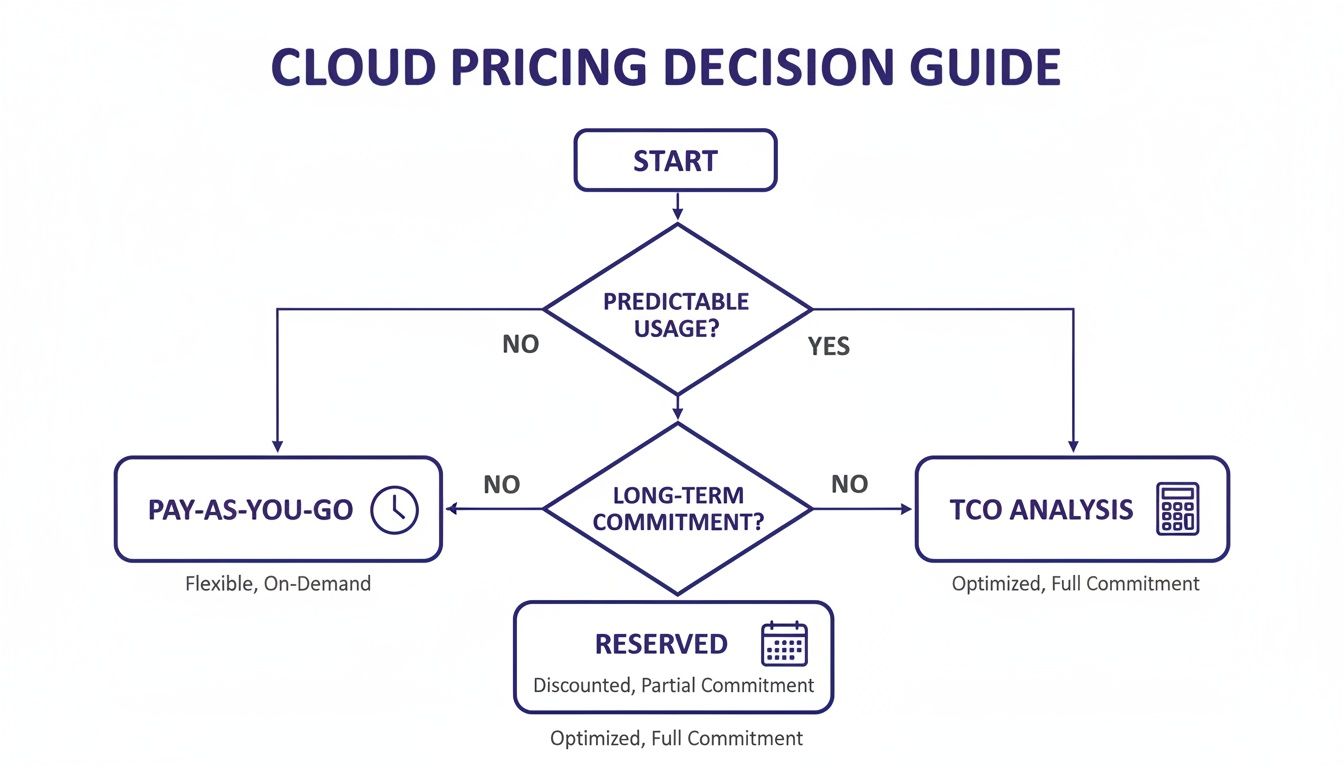
The key takeaway? Businesses with steady, predictable workloads—like most accounting and law firms—get the most value from fixed-cost models. It helps avoid surprise bills and makes budgeting a whole lot simpler.
A retail business with an e-commerce site needs a server that can handle fluctuating traffic, manage inventory databases, and process transactions without a hiccup. Downtime here means lost sales and angry customers, making reliability the absolute top priority. The server also has to be ready to scale for big sales or holiday rushes.
A baseline for an up-and-coming e-commerce business would be:
While these blueprints offer a solid foundation, they also highlight the core differences between various server types. For a deeper understanding of how these virtualized setups compare to physical hardware, our guide on VPS vs. dedicated servers provides valuable context.
Ultimately, when you start with a configuration built for your industry, you create a cloud environment that actively supports your business goals instead of just holding your files. It’s the smartest way to make sure you get the performance, security, and value you really need.
Choosing the right cloud server is a huge win, but the real work starts now: moving everything over. A successful transition hinges on a clear, well-structured migration plan that moves your apps and data without disrupting your business. Breaking the process down into phases—before, during, and after—is the key to making sure nothing gets missed.
A smooth migration isn't just a technical task; it's a strategic project that keeps your business running. For any company moving to the cloud, a solid plan is non-negotiable. It's smart to explore these critical data center migration best practices to build a strong foundation for your move. This way, you're not just moving files—you're setting your business up for what comes next.
Before you even think about moving a single file, you need a plan. This is where you prevent the common headaches and surprises that can derail a migration. Think of it as aligning your technical steps with your business goals.
Your pre-migration plan should cover a few key steps:
One of the biggest decisions you'll make is whether to handle the migration yourself or bring in an expert. An in-house migration gives you total control but demands serious time and technical skill from your team. This can pull them away from their day-to-day jobs and create risk if they’re not familiar with the new cloud environment.
This is exactly why managed cloud providers are such a powerful ally for small businesses. They step in as your dedicated IT partner, handling the entire migration from start to finish.
A managed provider doesn't just move your data; they architect the entire process. They handle the complexities of data transfer, application configuration, and security, letting you focus on running your company without missing a beat.
This turns what could be a high-stakes IT project into a seamless, expert-led transition.
Once your data is in its new home, the job isn't quite done. The final phase is all about rigorous testing to ensure everything is running just as you expected—or even better.
Your validation should include these key steps:
This roadmap gives you a clear path forward. For an even more granular guide, you can use a comprehensive cloud migration checklist to walk you through every single step. By partnering with a managed provider like Cloudvara, you can navigate this journey confidently, knowing that experts are making sure your move to the best cloud servers for your business is a success.
Even after weighing all the options, a few questions often pop up before making the final call. Let's tackle some of the most common ones small business owners ask when choosing a cloud server, so you can move forward with total confidence.
This really depends on the path you take. If you opt for an unmanaged server from a giant provider like AWS, you'll need significant IT expertise. You’re on the hook for everything—setup, security patches, and all the day-to-day maintenance.
On the other hand, a managed cloud server provider takes all of that off your plate. They handle the updates, security monitoring, and backups for you. This makes it a perfect fit for small businesses that don't have a dedicated IT team, freeing you up to run your business instead of managing servers.
Yes, and when you partner with a reputable provider, it’s often much more secure than keeping a server in your office. Top-tier cloud companies invest millions in security infrastructure, compliance certifications, and expert staff—resources far beyond what a typical small business can afford on its own.
The trick is to pick a provider with a proven security record. Look for essentials like end-to-end encryption, multi-factor authentication, and industry-specific compliance certifications like SOC 2 or HIPAA.
This multi-layered defense is what keeps your sensitive information safe from modern threats.
Think of a dedicated server as leasing a whole physical machine for yourself. It delivers strong performance but comes with a fixed capacity and cost. You get all the resources, but you can't just expand them on a whim.
A cloud server is a virtual machine running on a shared pool of physical hardware. This gives you incredible flexibility to scale resources like CPU, RAM, and storage up or down almost instantly. For most small businesses, the blend of cost-effectiveness, scalability, and built-in redundancy makes a cloud server the smarter long-term choice as your business grows.
Ready to see how a managed cloud server can simplify your IT and secure your applications? The expert team at Cloudvara can build a hosting environment designed for your specific business needs, from QuickBooks to industry-specific software. Explore our solutions and start your free 15-day trial today.




