
Imagine having a digital vault for your company’s most important data, one that’s guarded 24/7 by security experts. That's Backup as a Service (BaaS) in a nutshell. It’s a modern, automated way to protect your information, finally replacing those old, unreliable manual processes.
Think of Backup as a Service (BaaS) as the ultimate insurance policy for your company's most valuable asset: its data. Instead of crossing your fingers with external hard drives or tapes—which are prone to failure, theft, or damage—BaaS handles the entire backup process for you. It automatically and securely copies your data and sends it to a protected, off-site cloud environment managed by a dedicated provider.
This approach transforms data protection from a manual chore that often gets overlooked into a reliable, automated service. It's built from the ground up to defend against the kinds of threats that can bring a modern business to a standstill.
For years, businesses had to manage backups in-house. This meant buying expensive hardware, sinking staff hours into running tedious backup jobs, and physically hauling tapes or drives off-site. This old-school method is not only costly but also riddled with ways things can go wrong.
BaaS sidesteps these vulnerabilities by creating an "air-gapped" copy of your data in a separate, secure location. This separation is your ultimate defense, ensuring you always have a clean, untouched version of your files to restore from, no matter what disaster strikes your main office.
The move to BaaS is happening fast. The market was valued at USD 25.97 billion in 2024 and is expected to jump to USD 69.03 billion by 2030. This boom is driven by a huge spike in cyber threats—ransomware attacks have surged by over 150% globally since 2020—and increasingly strict data protection laws. You can see the full report on the Backup as a Service market growth from Research and Markets.
By outsourcing your backup strategy, you are not just buying storage; you are investing in expertise, automation, and peace of mind. A robust BaaS solution ensures your business can recover quickly from any data loss event, maintaining client trust and operational stability.
Ultimately, adopting a backup as a service model is a strategic decision that strengthens your business's resilience. For a deeper dive, check out our guide on cloud backup solutions for small businesses.
You don’t need a computer science degree to understand how Backup as a Service works. The whole point is to make data protection simple, automated, and invisible, letting it run quietly in the background without getting in your way. It all kicks off with a quick, one-time setup.
The process begins by installing a lightweight piece of software—often called an agent—on the computers, servers, or virtual machines you need to protect. This tiny agent acts as a secure bridge between your systems and the BaaS provider's cloud. It’s designed to be completely unobtrusive, using minimal resources so it never slows your team down.
Once the agent is running, it tackles the first and most important step: the initial full backup. This is the heaviest lift, where a complete copy of all your designated data—files, applications, system states, everything—is created and sent securely to the provider’s off-site data center. This first copy establishes the baseline for all future protection.
After that first full backup is complete, the system gets much smarter and more efficient. Instead of copying all your data over and over again, BaaS switches to incremental backups.
Think of it like editing a big report. After you write the first draft (the full backup), you don't rewrite the entire document every time you fix a typo or add a new sentence. You just save the changes. Incremental backups operate on the same principle; the agent only identifies the specific blocks of data that have changed since the last backup and sends just those tiny pieces to the cloud.
This approach delivers some huge advantages:
This diagram shows how the process flows from your business data straight to a secure cloud, skipping the risks tied to old-school, on-site methods.
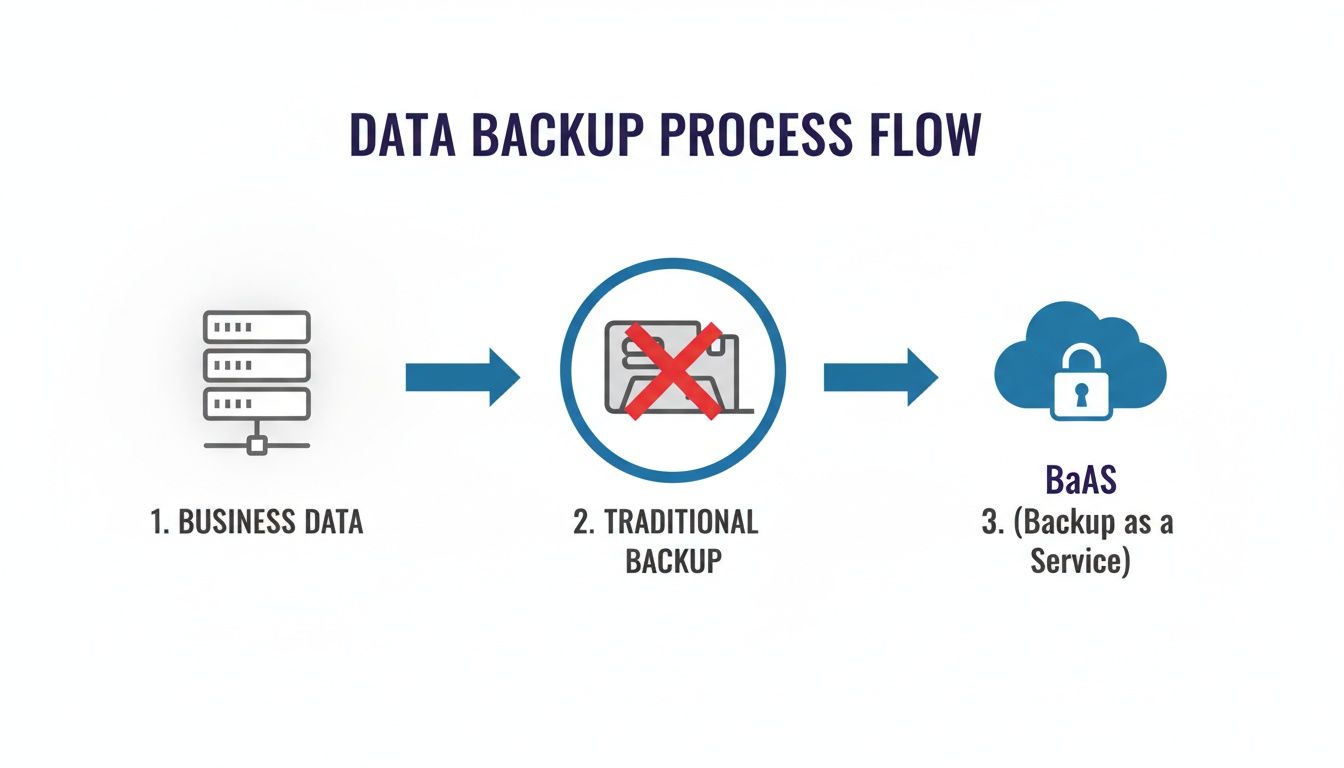
As you can see, BaaS creates a direct, modern, and secure path for data protection, leaving behind the vulnerabilities of physical tapes or local hard drives.
The real beauty of BaaS is its "set it and forget it" nature. You define the schedule—maybe you want to back up every hour during the workday—and the system takes care of the rest automatically. No one has to remember to press a button, which completely removes the risk of human error.
Of course, security is built into every step. Your data is encrypted before it ever leaves your network (in transit) and stays encrypted while stored in the cloud (at rest). It’s like sealing your information in a digital lockbox, sending it with a secure courier, and storing it in an unbreakable vault. Only you hold the key.
The core idea behind BaaS is to make data protection seamless. Automation ensures backups are always consistent, while strong encryption guarantees your data stays private, giving you a reliable safety net that works for you 24/7.
When something goes wrong—whether it’s a single deleted file or a complete server meltdown—getting back on your feet is just as straightforward. You just log into a secure web portal, find the file or system you need, and pick a recovery point. With a few clicks, you can restore a document to its original spot or even fire up an entire server from a clean backup, slashing downtime and keeping your business moving.
If you’re interested in the nuts and bolts of encryption, you can read more about best practices for maximizing data security with Azure Backup on our blog.
When it's time to protect your company’s data, choosing between Backup as a Service (BaaS) and a traditional on-premise setup can feel like comparing a modern electric car to a classic manual. Both get you where you need to go, but the efficiency, safety, and overall experience are worlds apart.
Let's break down the comparison by focusing on what really matters to your business operations and your bottom line.
Traditional backups rely on physical hardware you keep in your office—think external hard drives, dedicated servers, or even old-school tape drives. This approach puts the entire burden of buying, setting up, managing, and maintaining all that equipment squarely on your shoulders. It’s all on you.
With an on-premise system, you’re looking at significant capital expenditures (CapEx) right out of the gate. You have to buy the servers, storage disks, and software licenses upfront, which can be a hefty investment. But the costs don’t stop there. You’ve also got ongoing operational expenses for electricity, cooling, and the staff hours needed to keep it all running.
And what happens when your business grows? So does your data. Scaling an on-premise system means buying more hardware. You can’t just click a button for more space—you have to start another expensive procurement and installation cycle.
BaaS, on the other hand, operates on a predictable subscription model (Operating Expense, or OpEx). You pay a monthly fee based on the amount of data you're protecting, which makes budgeting simple and eliminates those large upfront costs. Scaling is completely seamless. As your data needs grow, your plan adjusts right along with you, no hardware headaches required.
This is where the differences really become clear. An on-premise backup is only as safe as its physical location. A fire, flood, or theft at your office could wipe out both your primary data and your local backups in one fell swoop. Worse yet, modern ransomware is specifically designed to hunt down and encrypt local backup files, making them useless when you need them most.
BaaS provides a critical layer of defense through geographic redundancy. Your data is stored in a secure, off-site data center, completely isolated from any disaster that might strike your office.
By creating a true "air-gapped" copy of your data, Backup as a Service ensures that a local catastrophe—whether physical or digital—doesn't become an extinction-level event for your business. You always have a clean, untouched version of your files ready to be restored.
This built-in separation is your best shield against ransomware. Even if your entire local network is compromised, your cloud-based backups remain safe and accessible. When looking at different strategies, it helps to understand the core differences between local vs. cloud backup solutions.
Finally, let's talk about the human element. Traditional backups are notoriously prone to human error. Someone has to remember to swap out tapes, double-check that backups actually completed, and troubleshoot the inevitable failures. It's a tedious, manual process that often gets overlooked when things get busy, leaving dangerous gaps in your data protection.
BaaS is built on automation. Once you set it up, backups run like clockwork on a schedule you define, with no manual intervention needed. The system also runs automated verifications to ensure your data is recoverable, giving you reliable, consistent protection you can count on. This frees up your team to focus on their real jobs instead of babysitting a backup server.
To help visualize these differences, here’s a side-by-side look at how the two approaches stack up.
| Feature | Backup as a Service (BaaS) | Traditional On-Premise Backup |
|---|---|---|
| Initial Cost | Low; no hardware purchase required | High; requires significant CapEx for servers and storage |
| Ongoing Costs | Predictable monthly subscription (OpEx) | Variable costs for power, cooling, and staff time (OpEx) |
| Scalability | Seamless; scale up or down on demand | Rigid; requires purchasing and installing new hardware |
| Security | High; off-site, geographically redundant, and air-gapped | Vulnerable to local disasters (fire, flood) and ransomware |
| Management | Fully automated and managed by the provider | Manual; requires staff to manage, monitor, and test |
| Recovery Speed | Fast; restore data from any location with an internet connection | Slow; dependent on physical hardware and on-site access |
| Reliability | High; automated verification and professional oversight | Prone to human error, hardware failure, and neglect |
Ultimately, the choice comes down to whether you want a hands-on, capital-intensive system or a streamlined, automated service that handles the heavy lifting for you. For most businesses, BaaS provides a more resilient, cost-effective, and reliable path to data protection. To dive deeper into the core IT infrastructure differences, you can learn more about the difference between cloud and on-premise models.
Beyond the technical specs, Backup as a Service (BaaS) delivers real-world results that hit your bottom line, boost your resilience, and frankly, help you sleep better at night. Think of it less as an IT upgrade and more as a strategic business decision that pays for itself across the entire organization.
The first thing most businesses notice is the immediate cost savings. Traditional backup systems demand a heavy upfront investment in servers, storage hardware, and software licenses. BaaS gets rid of all that, shifting your backup costs to a predictable, monthly operational expense.
This model also erases the hidden costs that come with on-premise solutions—like electricity, cooling, maintenance contracts, and most importantly, the valuable hours your IT team spends managing and troubleshooting a complex backup system.

In the world of disaster recovery, two metrics really define your ability to bounce back from a crisis:
BaaS solutions are built from the ground up to deliver much better RTO and RPO than old-school methods. Instead of spending days rebuilding a server from tapes, you can restore an entire client database or your most critical applications from the cloud in just minutes. You get back to business almost immediately, protecting both your revenue and your reputation.
Imagine a server running your firm’s entire operations crashes at noon. With an on-premise system, you might lose all data entered that morning and face a full day of downtime. With BaaS, you could restore a version from just 15 minutes ago and be fully operational before your next client meeting.
Security isn't just a checkbox for BaaS; it’s part of its DNA. By automatically moving your data off-site to a secure, encrypted cloud environment, BaaS creates a vital "air gap" between your live network and your backups. That separation is your single best defense against ransomware, which is designed to hunt down and encrypt your local backup files.
For businesses in regulated fields like accounting, legal, or nonprofits, keeping data safe and available isn't just good practice—it's a requirement. A backup as a service provider helps you meet strict compliance standards (like HIPAA, SOX, or GDPR) by offering:
This smarter approach to data protection is being led by small and medium-sized enterprises (SMEs), which now make up 60% of new BaaS adopters. They're slashing their data loss risks from a 1-in-3 failure rate with old methods to nearly zero, with recovery points possible in just minutes. This move helps them avoid their share of the $1.5 trillion annual global cybercrime bill while ensuring nearly 99% data availability. You can find more details on global BaaS market trends on Maximize Market Research.
Ultimately, BaaS turns data protection from a reactive, costly chore into a proactive tool for business continuity. You can explore more of the wide-ranging advantages of cloud backup solutions to see just how much stronger it can make your operations.
Picking a Backup as a Service (BaaS) provider isn’t like buying cloud storage; it’s like handing a partner the keys to your most critical business asset—your data. The right one becomes a silent, reliable guardian. The wrong one can open the door to a whole new set of risks.
To make the right call, you need to look past the flashy marketing and dig into the technical and operational details that truly deliver business resilience.
Your investigation has to start with security, the absolute core of any BaaS offering. Your data needs protection at every single stage. That means hunting for providers who use AES-256 encryption, the gold standard, both while your data is flying across the internet to their servers and while it’s sitting on their hard drives.
But encryption is just the beginning. You have to ask about who can access your data and how that access is logged and monitored. A trustworthy provider will give you granular controls and a transparent process for managing permissions, keeping your sensitive information under lock and key.
For businesses in regulated fields like law, accounting, or nonprofits, compliance is non-negotiable. Your BaaS provider absolutely must prove they meet the specific standards that govern your industry.
Don’t be shy about asking for proof. A reputable provider will have their certifications and audit reports ready to share.
Key certifications to look for include:
The stakes have never been higher. Cybersecurity threats are a massive driver for BaaS adoption, with a staggering 93% rise in ransomware incidents hitting small and medium-sized businesses in 2024. Even more alarming, 68% of organizations hit by ransomware couldn't get their data back without paying up. BaaS foils these attacks by creating air-gapped, unchangeable backups that can shrink recovery times from weeks down to a few hours.
A provider’s physical hardware is just as important as its digital security. Their data centers are the physical vaults holding your digital assets. You need to ask about their infrastructure's resilience, specifically their uptime guarantees, which should be clearly spelled out in a Service Level Agreement (SLA). Don't settle for anything less than 99.9% uptime.
Geographic redundancy is another deal-breaker. Does the provider keep copies of your data in multiple, geographically separate locations? This is what ensures a regional disaster like a hurricane or massive power outage won’t take your business down with it.
The quality of a provider's support team is a direct reflection of their commitment to your business continuity. You aren't just buying technology; you are buying a partnership that must be reliable during a crisis.
Finally, put their support team to the test. When disaster strikes, you need immediate access to experts who can help you, not a ticket number and a 24-hour wait. You can get a better sense of what to look for by reading our guide on how to choose the right cloud provider.
Crucial Questions to Ask a Potential BaaS Provider:
Here is the rewritten section, following all the provided instructions.
Making the move to Backup as a Service is a straightforward process when you have a clear roadmap. This step-by-step plan breaks down the transition into manageable stages, ensuring a smooth implementation that minimizes disruption and maximizes protection from day one.
Think of it like planning a road trip. You wouldn't just get in the car and start driving; you'd map your route, check your vehicle, and pack the essentials. A successful BaaS adoption begins with the same kind of careful planning, not just flipping a switch.
Before you can protect your data, you need to know exactly what you have. Start with a thorough inventory of your entire digital environment. This means identifying every server, virtual machine, laptop, and critical application that holds business information.
The goal here is to create a priority list. Which systems are absolutely essential for your daily operations? Your accounting software, client databases, and legal documents are likely at the top. This assessment forms the foundation of your backup strategy, ensuring your most critical assets get the highest level of protection.
With your data landscape mapped out, the next step is to define the rules of engagement. Your backup policy is a set of instructions that tells the BaaS system how, when, and where to protect your information. This is where you translate business needs into technical settings.
You’ll need to answer a few key questions for different types of data:
Once you’ve picked a vendor, it's time to plan the actual migration. Your first backup, often called the "initial seed," is the largest and most data-intensive, so it requires careful planning to avoid bogging down your network during business hours.
Many providers offer options for this initial transfer, such as scheduling it overnight or over a weekend. For very large datasets, some vendors even provide physical seeding, where you send them an encrypted hard drive with your initial backup to load directly into their data center.
The single most important step after setting up your backups is to prove they work. A backup strategy that hasn't been tested is not a strategy—it's just a hope.
This step is non-negotiable and critically important. After your initial backup is complete, you must immediately perform a test restore. This involves selecting a few representative files, or even an entire virtual machine, and recovering them from the BaaS platform.
A successful test restore verifies that the entire system works end-to-end. It confirms your data is not only being backed up but is also complete, uncorrupted, and readily accessible when you need it most. Make this a regular practice, not a one-time event. Finally, train your team on how to access and manage their data through the new system so everyone is prepared for a real recovery event.
Even with a clear grasp of the benefits, stepping into a new technology like Backup as a Service can bring up a few final questions. This section cuts straight to the point, answering the most common queries we hear from businesses so you can move forward with confidence.
We’ll tackle the big topics—security, pricing, and how BaaS holds up against modern cyber threats—making sure you have all the details you need.
This is usually the number one concern, and for good reason. A reputable BaaS provider builds its entire business around multi-layered security protocols that go far beyond what most individual businesses could manage on their own.
First off, end-to-end encryption is the standard. This means your data is scrambled before it even leaves your network, stays that way while traveling across the internet, and remains unreadable while stored in the provider's data center. Think of it as sealing your information in a digital safe that only you have the key to open.
On top of that, the physical security at these data centers is intense. We're talking about facilities with:
Unlike the huge, upfront capital investment of buying on-premise hardware, BaaS runs on a simple subscription model. You pay a predictable monthly fee based on how much data you’re protecting, turning a major capital expense into a manageable operating expense (OpEx).
This pay-as-you-go model gives you a much better total cost of ownership. You no longer have to budget for hidden costs like hardware maintenance, the electricity to run it, or the staff hours needed to manage a complex backup system. As your data grows, your plan scales right alongside you without forcing another massive hardware purchase.
With Backup as a Service, you stop paying for hardware you might need in the future and instead pay only for the protection you are actively using today. This shift eliminates wasted resources and makes enterprise-grade data protection affordable for any business.
Yes, it’s one of the strongest defenses you can have. Ransomware is designed to lock up not just your live data but also any local backup files it can find on your network. If your backups are sitting on-site, they’re just as vulnerable as your primary systems.
BaaS defeats this strategy by creating an "air-gapped," immutable copy of your data in a separate, off-site cloud environment. Your backups are physically and logically disconnected from your local network, making them invisible and out of reach for malware. If you get hit by an attack, you can confidently ignore the ransom demand, wipe your infected systems, and restore a clean, uncorrupted version of your data from your BaaS provider. It turns a potential business-ending catastrophe into a manageable inconvenience.
Ready to see how a secure, automated backup solution can protect your business and simplify your IT? Cloudvara offers a robust Backup as a Service platform designed for the unique needs of accounting firms, legal practices, and small businesses. Start your free, no-obligation 15-day trial today and experience true peace of mind. Explore Cloudvara's secure cloud solutions.




