
Application migration strategies are simply the different ways you can move an application from one place to another—like from your old in-house servers to a modern cloud environment. The approaches can be as straightforward as a "lift-and-shift" (Rehosting), where you make almost no changes, or as involved as a complete redesign (Rearchitecting) to squeeze every bit of performance out of the new infrastructure.
Picking the right path isn't just a technical choice; it's a strategic decision that will directly impact your costs, performance, and how quickly you can adapt in the future.
Are you wrestling with legacy systems that feel costly to run, impossible to change, and increasingly insecure? You’re not the only one. Many businesses find their old infrastructure is more of an anchor than an engine, holding back growth when it should be powering it. Application migration turns this IT headache into a genuine business opportunity.
Moving off outdated servers is about more than just ditching old hardware. It’s about giving your business a real competitive edge. A smart migration lays the groundwork for advanced tools like AI and data analytics—things that are often completely out of reach on aging systems.
Modern environments, especially the cloud, offer incredible flexibility. Think about scaling your resources up for the busy season and then back down when things get quiet, only paying for exactly what you use. This kind of elasticity lets you react to market shifts instantly instead of waiting months for new servers to be ordered and installed. The benefits of cloud migration go far beyond just saving a few bucks; they enable a far more dynamic and responsive way of doing business.
By modernizing, you transform your technology from a maintenance burden into a strategic asset. This shift empowers your teams to focus on creating value and innovating, rather than just keeping the lights on.
The numbers back this up. The global cloud migration market is expected to rocket from $232.51 billion in 2024 to $806.41 billion by 2029. This boom is fueled by real savings, with some companies slashing their total cost of ownership (TCO) by up to 40%. To really get a handle on the bigger picture, a strategic guide to legacy system modernisation is worth a read.
This guide is designed to give you a clear roadmap for making the switch. We'll walk through the core application migration strategies, often called the "7 Rs," to help you figure out which approach makes the most sense for your specific goals.
We’ll cover:
By the time you're done, you'll have the confidence to navigate your migration from start to finish.
When you're planning to move an application, you're not stuck with a single, one-size-fits-all approach. Instead, you've got a whole menu of application migration strategies known as the "7 Rs." Each one offers a different path forward depending on your needs, budget, and timeline. Getting to know these options is the first step toward making a smart, strategic decision for your business.
Think of it like moving to a new house. You have several ways to get your stuff from the old place to the new one, and each comes with its own price tag and effort. You could just pack everything in boxes and move it as-is (Rehost), or you could use the move as a chance to upgrade your old kitchen appliances (Refactor). The 7 Rs give you similar choices for your software.
This diagram shows how a solid migration strategy becomes the foundation for hitting bigger business goals, like innovating faster, becoming more agile, and gaining a competitive edge.
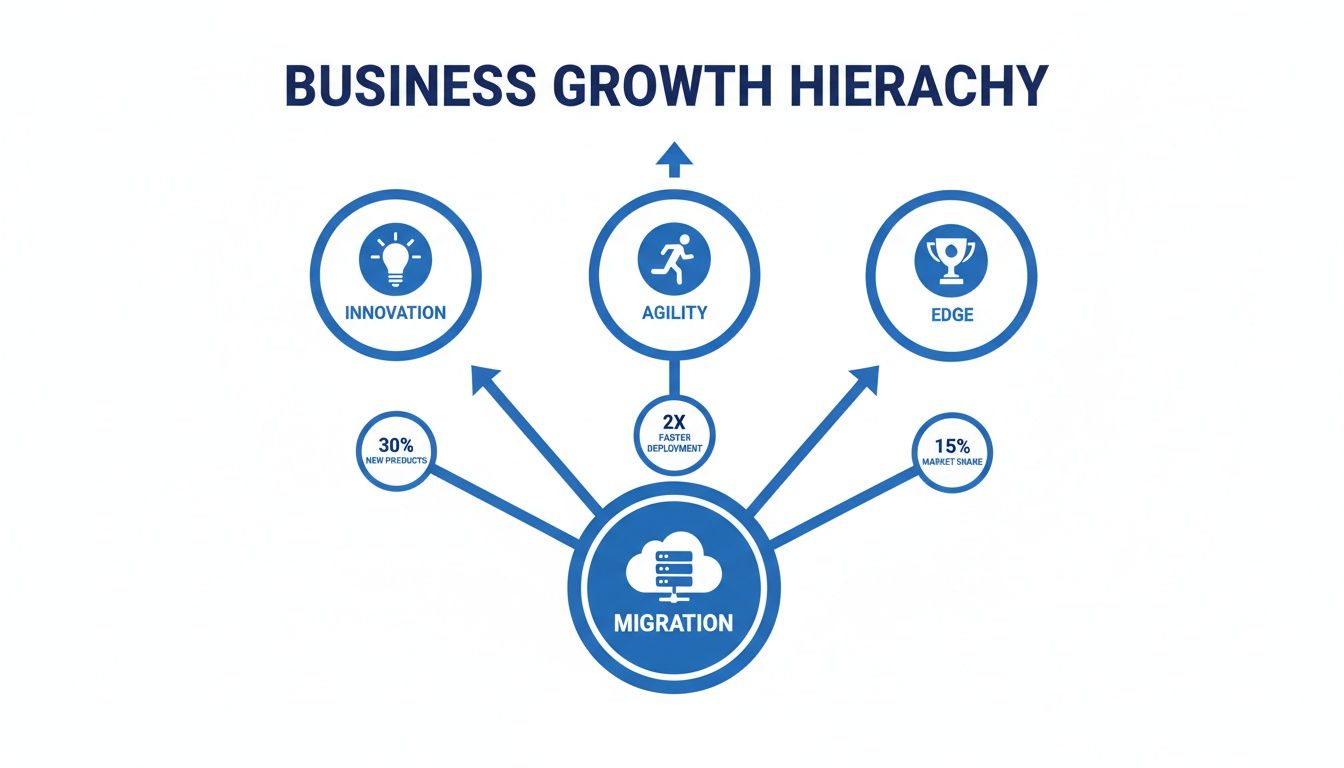
As you can see, the migration itself is what unlocks your ability to be more nimble and forward-thinking. Let's break down each strategy to see how they stack up.
Rehosting is the simplest route, often called "lift-and-shift." It's all about moving your application from its current server to a new one—like a Cloudvara dedicated server—with almost no changes to the code.
Imagine you’re moving houses and you just load all your furniture onto a truck and unload it in the new home. It’s the fastest way to get everything moved, but you’re not making any improvements. This is perfect for businesses that need to get out of a data center fast or are migrating simple, off-the-shelf applications.
Replatforming is a step up from a simple rehost. You still move the application, but you make a few small, targeted tweaks to take advantage of the new environment. You’re not rewriting the core architecture, just making minor upgrades.
In our moving analogy, this is like moving your furniture but also swapping out the old lightbulbs for energy-efficient LEDs. It’s a small change that offers a real benefit without a major renovation. A common example is moving a database to a managed cloud service to cut down on admin work.
Sometimes, it just makes more sense to switch to a new product entirely. Repurchasing means you retire your old application and move to a new solution, often a SaaS platform, that does the same job—or an even better one.
This is like deciding your old, mismatched furniture isn't worth the trouble of moving. Instead, you get rid of it and buy a new, coordinated set for your new home. Moving from a clunky, locally hosted CRM to a cloud-based platform like Salesforce is a classic example of this strategy.
Now we're getting into the heavy lifting. Refactoring and Rearchitecting are the most intensive strategies because they involve big changes to the application's code and structure.
These are the "full renovation" options in our moving analogy. Refactoring is like upgrading the plumbing and electrical systems in your new house. Rearchitecting is like knocking down walls to create an open-concept living space. These approaches are costly and take time, but they can deliver the biggest payoffs in performance, scale, and agility. For a deeper look, Cloudvara has a complete guide to legacy system modernization strategies.
Relocating is a more technical move, usually for large-scale migrations. It involves moving your infrastructure to a different hypervisor environment—like a new VMware Cloud instance—without touching the application itself. It's often highly automated, allowing teams to move hundreds of virtual machines quickly.
Retaining is the strategy of doing nothing at all. After a careful look, you might decide an application is working just fine where it is, or that the cost of moving it outweighs any potential benefit. You simply keep it running in its current environment and focus your efforts elsewhere.
Finally, you might find that an application is no longer needed. The retire strategy is about decommissioning software that has become redundant or obsolete. This frees up resources—both financial and technical—that can be redirected to more valuable projects.
To help you visualize the trade-offs, here’s a quick comparison of the 7 Rs.
This table breaks down each of the 7 Rs, giving you a clear picture of the effort, cost, and risk involved, plus the best situations for each approach.
| Strategy (The 'R') | Description | Effort & Cost | Risk Level | Best For |
|---|---|---|---|---|
| Rehost | Move the application "as-is" to a new environment with no code changes. Also known as "lift-and-shift." | Low | Low | Quick migrations, moving off-the-shelf software, or exiting a data center on a tight deadline. |
| Replatform | Move the application with minor optimizations to take advantage of the new platform. | Low-Medium | Low | Gaining cloud benefits (like managed services) without a full rewrite. |
| Repurchase | Switch from a legacy application to a modern SaaS product that provides similar functionality. | Low | Low | Moving away from custom or outdated systems to a standard, subscription-based solution. |
| Refactor | Make significant changes to the application's code to improve performance, scalability, or features. | High | High | Modernizing a core business application to add new capabilities and improve long-term value. |
| Rearchitect | Fundamentally alter the application's architecture, often moving to a microservices-based design. | Very High | Very High | Splitting a large, monolithic application into smaller, more agile services for maximum scale. |
| Relocate | Move infrastructure (like VMs) to a new platform without altering the application itself. | Low-Medium | Low | Large-scale data center consolidations where automation can move hundreds of workloads quickly. |
| Retain/Retire | Decide to either keep an application as-is or decommission it entirely if it's no longer needed. | Very Low | Very Low | Applications that are not business-critical or are being phased out. |
Choosing the right path from these seven options comes down to your business goals, technical needs, and budget. By understanding the trade-offs of each, you can build a migration plan that delivers real, lasting value.
Jumping into an application migration without a clear plan is like starting a cross-country road trip without a map. You might get there eventually, but you’re guaranteed to hit unexpected detours and run up unnecessary costs along the way.
A thorough pre-migration assessment is the single most important step you can take. It’s what ensures your project stays on track, on budget, and actually delivers the business value you’re after. This initial discovery phase transforms what could be a risky technical exercise into a predictable, strategic move.
Think of it as creating a detailed blueprint before breaking ground on a new building. This is where you uncover the hidden complexities of your applications, align technical requirements with business goals, and build a solid foundation for your chosen migration strategy. Skipping this step often leads to scope creep, budget overruns, and frustrating service disruptions down the line.

Before you analyze a single line of code, you have to answer one fundamental question: Why are we doing this? The answer can't just be technical. Successful migrations are always driven by clear business outcomes.
Are you trying to slash operational costs? Boost application performance? Or maybe give your team the agility to launch new features faster? Setting specific, measurable goals is crucial here.
For instance, instead of a vague goal like "improve performance," aim for something concrete: "reduce average page load time by 40% within three months of migration." These targets will guide every decision you make, from choosing the right environment to measuring the project's ultimate success.
Next, it’s time to get under the hood of your application. You need to understand not just what it does, but how it’s built and what it connects to. This means taking a deep dive into its architecture and all its dependencies.
Start by asking these critical questions:
A thorough dependency mapping process is non-negotiable. It prevents the dreaded "we moved the app, but now nothing works" scenario by ensuring every piece of the puzzle is accounted for before you start.
Security and compliance aren't afterthoughts; they have to be baked into your assessment from day one. This is especially true for businesses in regulated fields like accounting and legal, where data privacy and integrity are paramount.
Your assessment has to document all existing security controls and compliance mandates.
Key considerations should include:
A detailed assessment will help you create a plan that covers all your bases. For a complete walkthrough, check out our guide on building a cloud migration checklist to ensure no stone is left unturned.
The reality is that modern IT environments are increasingly distributed. By 2025, over half of all business workloads will be in the public cloud, and a staggering 87% of organizations are already using multi-cloud strategies to boost flexibility and avoid vendor lock-in. You can find more insights on this in the latest State of the Cloud report. This complexity makes a detailed pre-migration assessment more critical than ever.
You’ve finished the deep-dive assessment of your applications, and now you have a clear map of your entire software landscape. The next step? Turning all that insight into a confident, strategic decision. This is where a decision framework comes in, acting as your compass to point you toward the right migration strategy.
Instead of getting bogged down in the technical jargon of each "R," a solid framework helps you cut through the noise. It works by prompting you with a series of targeted questions about both the business and the technology. The conversation shifts from a simple "what can we do?" to a much smarter "what should we do?" to hit our goals.
Following a structured approach like this ensures your final choice isn't just technically feasible. It guarantees the path you pick aligns perfectly with your company's bigger picture, balancing cost, risk, and the actual value you hope to create.
Think of this framework as a practical flowchart for your decision-making. As you work through the questions for each application, you’ll naturally start to eliminate some of the seven migration strategies and zero in on the one or two that truly fit.
The core of this process boils down to a few key lines of inquiry.
Business Value and Advantage: How critical is this application to our daily operations or competitive edge? A mission-critical system that sets you apart from the competition might justify a major investment like Rearchitecting. On the other hand, a generic back-office tool is probably a perfect candidate for a simpler Repurchase or Rehost.
Technical Health and Viability: Is the application built on a solid foundation, or is it a crumbling liability held together with digital duct tape? An app running on outdated tech that’s a nightmare to maintain is a strong contender for Refactoring or Rearchitecting. In contrast, a modern, well-built application could be easily Rehosted or Replatformed with minimal fuss.
Cost and Resource Tolerance: What’s our actual budget and timeline for this migration? An aggressive schedule might push you toward a quick lift-and-shift (Rehost), whereas a bigger budget and a long-term vision could support a more ambitious approach.
Risk and Downtime Appetite: How much disruption can the business really handle? For a financial services firm where minutes of downtime can cost a fortune, a careful, phased migration with robust fail-safes is non-negotiable. But for a non-critical internal tool, a scheduled maintenance window for a faster cutover might be perfectly acceptable.
This kind of questioning pulls the conversation out of the server room and connects it to the financial and operational realities of your business. A well-defined cloud adoption strategy is built on answering these questions honestly and realistically.
To see how this works in practice, let’s look at two very different businesses.
Scenario 1: The Fast-Scaling Startup
A rapidly growing e-commerce startup is maxing out its initial server setup. Their main goal is achieving speed and scalability to handle huge, unpredictable traffic spikes during sales. Their custom-built analytics engine gives them a massive competitive advantage, but it’s starting to become a performance bottleneck.
Scenario 2: The Established Legal Firm
A law firm needs to move its on-premise document management system into a more secure and accessible environment. Their absolute top priorities are 100% data integrity, strict compliance with industry regulations, and zero disruption to client work. The software is a third-party application, and they have no in-house developers.
By framing the decision around business needs, the right technical path becomes clear. The goal isn't just to move an application; it's to make the business stronger, faster, or more secure in the process.
Let’s be honest—the two biggest fears in any application migration are downtime and risk. A technically perfect migration doesn't mean much if your customers can't access your services or your business grinds to a halt. Luckily, you can avoid these headaches. Modern strategies are designed to make the transition so smooth, it’s almost invisible.
Forget the high-stakes, all-at-once "big bang" cutover. Smart teams treat migration like gradually redirecting traffic from an old, bumpy road to a brand-new highway. You keep the cars moving the whole time. This phased approach is the key to de-risking the entire process and avoiding common traps like data loss, security gaps, and performance nightmares.

To keep the lights on, your strategy needs to allow both the old and new environments to run at the same time while you carefully shift users over. This parallel operation is what lets you manage risk without holding your breath.
Here are three of the most effective tactics:
Blue-Green Deployments: This is a classic. You create an exact clone of your current environment (let's call it "blue") in the new location (the "green" one). Once you've tested the green environment and know it’s solid, you just flip a switch at the router to send all traffic its way. If anything goes wrong? Just flip it back. Rollbacks are almost instant.
Canary Releases: Think of this as testing the waters. You roll out the new application to a small, select group of users—your "canaries in the coal mine." You watch their experience like a hawk. If everything looks good, you gradually open the floodgates until everyone is on the new system.
Phased Rollouts: This is a lot like a canary release, but you segment users by something specific, like their geographic region or account type. You might move all your users in Canada first, or perhaps migrate your free-tier users before touching your enterprise clients. It’s a great way to contain risk and let your team learn as you go.
Great deployment tactics are only half the battle. You also need a solid risk management framework. This isn't just about technology; it's about planning for what could go wrong. A strong framework is built on a foundation of preparation, automation, and crystal-clear recovery plans.
The goal isn't to hope for a perfect migration; it's to plan for an imperfect one. Having a tested rollback strategy and automated backups is what transforms a potential crisis into a manageable hiccup.
Your framework should always include:
At the end of the day, human error is still one of the biggest risks in any complex IT project. Automation is your best defense. Modern tools can handle many of the most delicate migration tasks, from checking data integrity to translating code between environments.
For example, AI-powered tools can now automate tedious jobs like data validation, ensuring up to 100% accuracy and parity between your old and new databases. This can eliminate the need for manual spot-checks at scale, dramatically cutting down on downtime and speeding up your project timeline. You can explore more about these data migration trends and tools that are changing how businesses approach risk.
Trying to execute a complex application migration on your own is like navigating a storm without a compass. Even the most detailed plans can't account for every surprise, and that’s where a knowledgeable partner becomes essential. A good managed hosting provider acts as your expert crew, guiding your project away from common icebergs like extended downtime and security holes.
This kind of partnership is what turns abstract migration goals into real, secure results. It’s all about having the right people and the right tools ready to go exactly when you need them.
A true partner never pushes a one-size-fits-all solution. Instead, they listen to your strategy and provide the specific infrastructure and support to match it. This ensures your technical execution lines up perfectly with your business goals, whether you’re prioritizing speed, security, or a complete overhaul.
Think about how the right tools fit specific strategies:
Choosing a partner means you're not just buying server space; you're investing in a team dedicated to the success and security of your migration. This collaborative approach is a core component of effective Cloud Migration Services.
One of the biggest anxieties in any migration is committing to a new environment before you’re 100% sure it works. This is where a trial period becomes a game-changer, letting you test your plan in a live setting without any financial risk.
If you’re bringing in a cloud strategy consultant to help map out your move, a partner offering a free trial lets you immediately put their advice into practice. You can run performance tests, check for compatibility issues, and make sure your team is comfortable with the new setup—all before making the final switch. It’s the smartest way to guarantee a smooth and successful transition.
When you start digging into application migration, a lot of practical questions bubble up. Getting clear, straightforward answers is the best way to build confidence and make sure your project is pointed in the right direction. Here are some of the most common questions we hear from businesses getting ready to make a move.
We'll cover the big topics: choosing a strategy, setting realistic timelines, and figuring out what a successful migration actually looks like. The goal is to give you quick, solid insights to help you make smarter decisions.
Hands down, Rehosting (also known as "lift-and-shift") is the go-to starting point for most businesses. Its popularity comes from one simple fact: it's the fastest and least disruptive way to get the job done. You’re essentially picking up an application and moving it to a new cloud environment with very few code changes, which makes it perfect for companies that need to get out of an on-premise data center quickly.
But here’s the trade-off. While Rehosting gets you to the cloud fast, it doesn't really unlock all the cool benefits the cloud offers. Many smart companies use it as step one, fully intending to come back later to refactor or replatform the application. That second step is where they modernize it to really juice up performance and cut costs.
There’s no magic number here—the timeline is all about the strategy you pick and how complex your application is. A simple Rehosting of a small, self-contained app might only take a few weeks from the first planning meeting to the final switch-over.
On the other hand, if you're talking about a full Rearchitecting of a huge, tangled legacy system, you could be looking at several months or even over a year. The only way to get a timeline you can trust is to do a deep, thorough pre-migration assessment. That's what uncovers all the hidden dependencies and potential roadblocks before they have a chance to derail your project.
Success isn't just about flipping a switch and having everything work. It’s about hitting the specific business goals you laid out from the very beginning. That's why setting clear key performance indicators (KPIs) before you even start is so important—it's how you'll prove the project delivered a real return on your investment.
The true measure of a successful migration is tangible business improvement. You must be able to point to specific metrics that show the move delivered real value, whether through cost savings, better performance, or increased business agility.
Here are a few common KPIs you should be tracking:
At Cloudvara, we partner with you to simplify your migration, providing the secure infrastructure and expert support needed for a seamless transition. Our dedicated servers and 24/7 assistance ensure your applications are high-performing and always available. Experience the difference with a free, no-obligation trial by visiting https://cloudvara.com.




