Deciding on a move to the cloud isn't about whether it's "good" or "bad"—it’s about a critical trade-off. On one side, you get incredible scalability, cost-efficiency, and operational agility. On the other, you have to navigate potential minefields like unpredictable costs, complex security duties, and the risk of vendor lock-in.
The right decision hinges on aligning the cloud's powerful capabilities with your specific business goals and how much risk you're willing to take on.
The shift to cloud services is no longer a fringe trend; it's a core part of modern business strategy. With the global cloud market expected to hit $1.614 trillion by 2030, it’s obvious that companies see real value in ditching traditional on-premise hardware. In fact, around 94% of enterprises already use cloud services in some way, solidifying its role as an essential platform. You can find more data on this growth in recent cloud computing statistics.
But just because everyone’s doing it doesn’t make the choice a simple one. The real debate for any organization is balancing the huge upsides against some very tangible risks.
On one hand, the cloud lets you spin up resources on demand, pay only for what you consume, and tap into enterprise-grade tech without a massive upfront investment. That kind of agility can put innovation and market response into overdrive.
On the other hand, a successful cloud strategy requires you to keep a close eye on the downsides. Security is a shared responsibility, operational costs can spiral out of control without tight governance, and leaning too heavily on one provider can create long-term strategic headaches.
The best cloud strategies aren’t built on a leap of faith. They come from a clear-eyed assessment of these trade-offs, making sure the path you choose meets both your technical needs and your business objectives.
To help you start that analysis, we've put together a quick overview of the main pros and cons. We'll dive deeper into each of these points throughout this guide, but you can also explore our detailed look into the specific benefits of cloud computing for businesses.
This table offers a high-level look at the fundamental trade-offs you'll face when considering a move to the cloud. It's a starting point for weighing what you'll gain against what you'll need to manage.
| Aspect | Key Advantage (Pro) | Key Disadvantage (Con) |
|---|---|---|
| Cost Structure | Eliminates large upfront hardware purchases (CapEx) in favor of a pay-as-you-go model (OpEx). | Can lead to unpredictable monthly bills and budget overruns without strict cost governance. |
| Scalability | Resources can be scaled up or down instantly to meet fluctuating demand, ensuring performance. | Auto-scaling, if misconfigured, can result in unexpected high costs during traffic spikes. |
| Security | Access to world-class security infrastructure managed by top-tier providers. | The "Shared Responsibility Model" requires customers to secure their own data and applications. |
| Maintenance | The provider handles all hardware maintenance, patches, and infrastructure updates. | Less direct control over the underlying infrastructure and update schedules. |
| Accessibility | Enables secure access to data and applications from any location with an internet connection. | Performance can be affected by internet connectivity issues and network latency. |
Each of these points represents a critical decision factor. As we continue, we’ll break down what they mean in practical terms for your daily operations and long-term strategy.

One of the biggest selling points for moving to the cloud is the financial shift from capital expenses (CapEx) to operational expenses (OpEx). Instead of buying a truckload of expensive servers upfront, you pay a predictable monthly fee. This pay-as-you-go model sounds great, but it's easy to get tunnel vision and miss the real Total Cost of Ownership (TCO).
The initial savings are obvious—no massive hardware bill, no server room to maintain. But the operational costs in a cloud world are far more slippery than a single subscription. Many businesses get a rude awakening when they see the variable expenses that were hiding in the fine print.
These "hidden" costs can pile up fast, leading to some serious budget overruns if you're not paying close attention. Getting a handle on these potential expenses is a non-negotiable part of weighing the true pros and cons of cloud computing.
Smart financial planning means digging into the details of every possible charge. Sure, compute and storage are the headliners, but a few other factors can make your monthly bill balloon unexpectedly:
Without a solid governance plan, these costs can spiral out of control. For instance, a developer might forget to shut down a testing environment over the weekend, letting it chew through resources and cash. When small oversights like that happen across a whole company, the financial impact is huge. To get a better grip on these variables, check out our detailed guide on effective cloud cost optimization strategies.
The constantly shifting nature of the cloud makes accurate forecasting a real headache. While global public cloud spending is expected to reach a staggering $723.4 billion in 2025, a surprising 20% of companies admit they have poor visibility into how their cloud spend actually connects to business goals. You can find more insights on these cloud spending trends on cloudzero.com. That lack of clarity makes it tough to prove ROI.
A successful cloud financial strategy isn't just about cutting costs—it's about squeezing every drop of value from every dollar you spend. That means proactive monitoring, clear accountability, and the right set of tools.
To fight back against budget chaos, businesses need to get serious about cost management. This involves using the cloud provider's own tools, like AWS Cost Explorer or Azure Cost Management, to set budgets with automatic alerts. It also means tagging resources to assign costs to specific projects or departments. By building a culture of financial accountability, you can turn unpredictable operational costs into a strategic tool that fuels real business growth.
One of the most compelling reasons businesses jump to the cloud is the incredible boost in operational agility. The cloud lets companies react to market shifts with stunning speed, deploying applications worldwide in minutes instead of months. This on-demand access to resources is a massive advantage in any cloud evaluation.
Think of an e-commerce platform facing a holiday sales rush. Using auto-scaling, it can instantly handle a massive traffic spike, ensuring a smooth customer experience without anyone needing to manually provision servers. This elasticity prevents system crashes and lost sales—a common nightmare for businesses locked into fixed on-premise infrastructure.
However, this newfound agility comes with performance variables that need careful management. As you weigh the pros and cons of cloud computing, reliability quickly becomes a central concern.
While the cloud offers immense computing power, that power is shared. Your applications are running on the same hardware as other customers, which can sometimes create performance issues.
These issues bring a core conflict to light: gaining deployment speed can sometimes mean giving up the consistent, predictable performance of a dedicated on-premise setup. Knowing how to manage this is fundamental to improving application performance anywhere.
The core decision isn't just about raw speed but about consistency. A business must weigh whether the ability to scale instantly outweighs the risk of occasional performance fluctuations inherent in a shared model.
For a huge number of workloads, the cloud’s performance benefits are undeniable. Startups can innovate without sinking cash into expensive hardware, and global companies can serve customers with low latency by deploying resources in data centers close to them.
Take a mobile gaming company launching a new title. It’s nearly impossible to guess how many users will show up on day one. The cloud lets them start small and scale resources almost infinitely as the game takes off. This stops them from either overspending on servers that sit idle or under-provisioning and watching their game crash on launch day.
Ultimately, the right choice boils down to the specific workload. For applications where absolute, unwavering performance is non-negotiable—like industrial control systems or certain scientific computations—an on-premise solution might still be the better choice. For almost everything else, the cloud’s agility offers a powerful engine for growth and innovation that’s incredibly difficult to build in-house.
Security is a massive piece of the cloud computing puzzle. On one hand, major providers like AWS, Azure, and Google Cloud offer a level of physical and network security that most companies could only dream of building themselves. That robust, battle-tested infrastructure is a huge advantage.
However, a dangerous misconception is that moving to the cloud means you can wash your hands of security. That couldn’t be further from the truth. The reality is governed by the Shared Responsibility Model, a core concept you absolutely have to understand before you move a single byte of data.
Simply put, the provider secures the cloud itself—the data centers, the hardware, the core networking. You, the customer, are responsible for securing everything you put in the cloud. Your data, your applications, your user access—it's all on you.

Misconfigurations are the number one cause of cloud data breaches, and they almost always stem from a misunderstanding of this shared responsibility. A simple mistake, like leaving a storage bucket public or giving a user overly permissive access rights, can expose sensitive information to the entire world.
Your security duties typically include:
The most secure cloud infrastructure on the planet won't protect you from a simple human error in configuration. Your internal policies and oversight are just as critical as the provider's security measures.
Effectively managing these tasks is non-negotiable, especially for businesses in regulated industries. For a deeper dive, our guide on how to implement effective cloud security solutions in 2024 offers practical steps.
To make this clearer, let's break down who manages what across the different cloud service models—Infrastructure as a Service (IaaS), Platform as a Service (PaaS), and Software as a Service (SaaS). Notice how the customer's responsibility shrinks as you move from IaaS to SaaS, but it never disappears entirely.
| Responsibility Area | Customer Manages | Provider Manages |
|---|---|---|
| Data & Access | Data classification, access policies, user accounts | Ensures data isolation between tenants |
| Applications | Application code, updates, runtime (IaaS/PaaS) | Application software and updates (SaaS) |
| Operating System | OS patching, configuration (IaaS) | OS and middleware (PaaS/SaaS) |
| Network Controls | Firewalls, security groups, routing (IaaS/PaaS) | Core network infrastructure, DDoS protection |
| Physical Infrastructure | (None) | Data centers, servers, storage, networking hardware |
This table shows why it's so important to know which service model you're using. With IaaS, you're managing almost everything short of the physical hardware. With SaaS, the provider handles most of the technical stack, but you still own the responsibility for your data and who can access it.
For any business handling sensitive information, compliance with regulations like GDPR, HIPAA, or SOC 2 is mandatory. Cloud providers offer infrastructure and services that meet these standards, but simply using a "HIPAA-compliant" service doesn't make you compliant.
You have to prove that your own configurations, access controls, and data handling procedures satisfy these strict rules. This requires careful architectural planning from day one and continuous monitoring to ensure your cloud environment stays compliant as it changes over time.
Thinking about cloud computing goes way beyond immediate costs or performance boosts. Two factors—vendor lock-in and environmental sustainability—are crucial for your long-term strategy, shaping both your future agility and your corporate responsibility.
Vendor lock-in is a very real risk where moving your apps and data to another provider becomes so complex and expensive it feels impossible. This trap springs when you become too dependent on a provider’s unique services, like their specialized databases or proprietary AI tools that don’t have a simple equivalent elsewhere. What starts as a convenient feature can quickly become a strategic dead end.
Choosing a cloud provider is like picking a foundational partner for your technology stack. A decision made for short-term convenience can create significant long-term dependencies that limit your future options.
While you can’t avoid some level of dependency, you can absolutely design your systems for greater portability. A strategic approach here keeps you in control of your own technology roadmap.
Key strategies include:
Making these choices requires a bit of upfront planning. Our guide on how to choose a cloud provider offers a solid framework for balancing powerful features with long-term flexibility.
The second major consideration is the environmental footprint of cloud services. Data centers are huge consumers of power and water, but their scale also creates opportunities for massive efficiency gains.
Globally, data centers use between 1% and 1.5% of the world's electricity. But here’s the upside: the sheer scale of major providers allows for incredible optimization. Shifting to an Infrastructure as a Service (IaaS) model can slash emissions by as much as 84% compared to running your own on-premise servers, thanks to smarter resource use and advanced cooling.
Aligning your tech choices with your company's social responsibility goals is no longer optional. Most top cloud providers are transparent about their green initiatives, publishing reports on their energy sources and water usage. By picking a provider committed to renewable energy, you ensure your digital operations contribute to a healthier planet.
Figuring out the pros and cons of cloud computing isn’t about chasing a single “best” answer. It’s about finding the strategy that fits your specific business like a glove. The right choice hinges entirely on your priorities, from tight budgets to strict regulatory demands.
A solution that gives a startup wings could easily clip them for a large, established enterprise. By mapping your unique needs against what the cloud offers—and where it falls short—you can carve out a clear path forward. This all starts with an honest look at what your organization truly values.
Different business models have wildly different priorities, which means their ideal path to the cloud will look just as different.
For the Agile Startup: The name of the game is minimizing upfront costs while maximizing speed and the ability to grow. Public cloud services are a natural fit, offering pay-as-you-go pricing that lets you skip the heavy capital investment in hardware. Being able to scale on demand is everything when you're facing unpredictable growth and need to keep the budget in check.
For the Established Enterprise: These organizations are often juggling legacy systems with modern demands. A hybrid cloud model usually hits the sweet spot, letting them keep sensitive data or core applications on-premise while using the public cloud for development, testing, and customer-facing apps that need more flexibility.
For Regulated Industries: If you're in finance, healthcare, or government, you're dealing with non-negotiable rules around compliance and data sovereignty. A private cloud or a meticulously configured hybrid solution is often the only way to maintain strict control over data location and security, ensuring you stick to standards like HIPAA or GDPR.
This decision tree helps visualize how long-term goals, like avoiding vendor lock-in or prioritizing sustainability, can fundamentally shape your cloud strategy from day one.
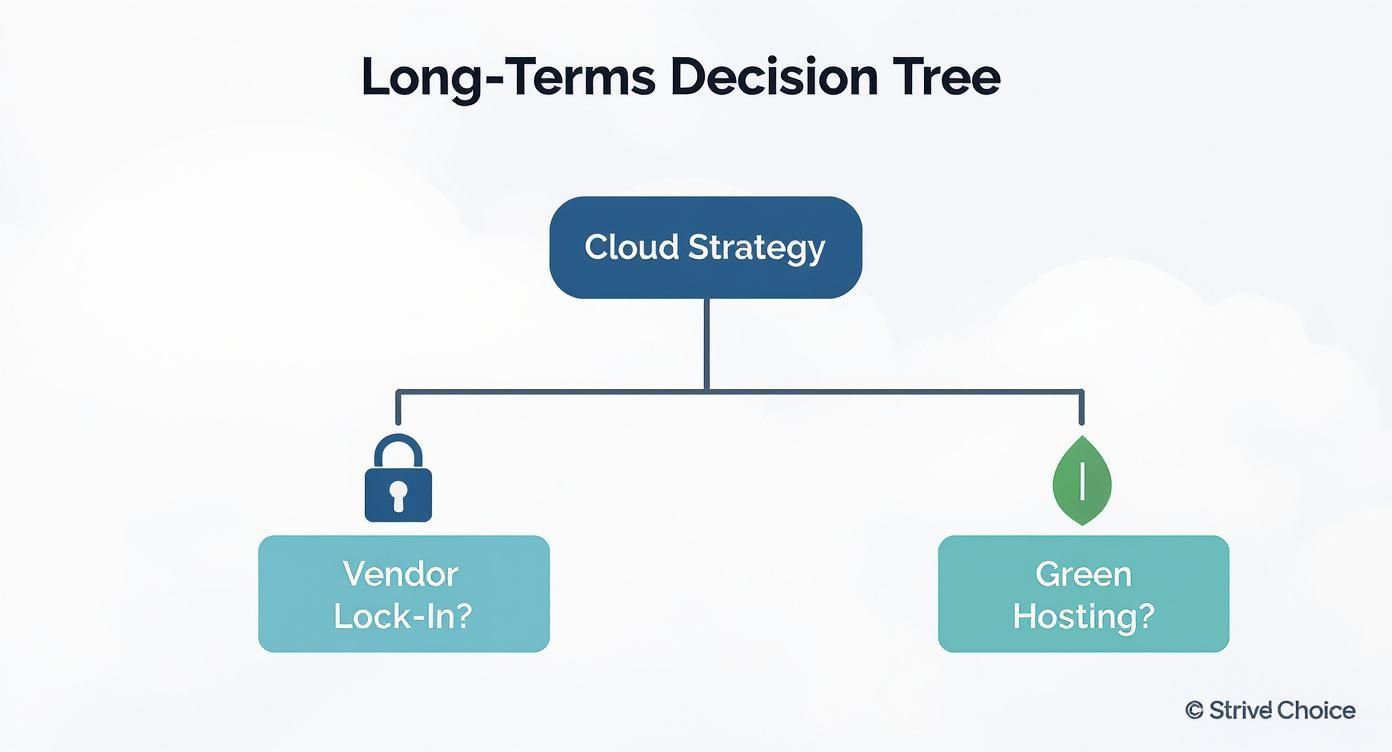
The image makes it clear: the strategic choices you make early on have a massive ripple effect on everything from your operational freedom down the road to your corporate responsibility.
The right cloud decision is a strategic alignment between your operational realities and long-term goals. It's less about the technology itself and more about how that technology serves your specific business mission.
When looking at the broader cloud ecosystems, it pays to understand the integrated programs and their benefits. For instance, nonprofits can explore the comprehensive features of Google for Nonprofits to see how a purpose-built suite of tools can align with their unique operational needs and budget realities.
In the end, a successful move to the cloud always starts with a deep understanding of your own organization's DNA.
When you start weighing the pros and cons of cloud computing, a few key questions always come up. Getting straight, practical answers is the only way to make a strategic decision that actually fits your business goals and how you operate day-to-day.
Many leaders hear "cloud" and immediately think "cheaper," but that's a common misconception. Trading a big upfront hardware purchase (CapEx) for a monthly subscription (OpEx) doesn't automatically shrink your budget. Hidden costs for things like data egress or API calls can sneak up on you, quickly inflating that predictable monthly bill. Real savings come from active management and having skilled people who can keep spending in check.
Another major point of concern is data security. And it's a valid one. While top providers like AWS and Azure have fortress-like infrastructure security, it’s critical to understand the Shared Responsibility Model. They secure the cloud itself—the data centers, the hardware, the core network—but you are always responsible for securing your data, configurations, and user access within the cloud.
A simple misconfiguration on your end can open the door to a major data breach, no matter how tough the provider’s underlying security is.
Vendor lock-in is the risk of becoming so dependent on a provider's specific tools that switching to a competitor becomes too difficult and expensive to justify.
This dependency can box you in, limiting your flexibility and weakening your negotiating power down the road. The best way to sidestep it is to plan for portability from the start. Prioritize open-source tools like Kubernetes, build your applications in containers, and think about a multi-cloud-ready architecture from day one. These steps ensure you stay in control of your tech stack, preventing a short-term convenience from becoming a long-term headache.
Ready to move your business applications to a secure, reliable, and cost-effective cloud environment? Cloudvara offers dedicated cloud hosting with 24×7 support and a 99.5% uptime guarantee, centralizing your software on a platform you can trust. Start your free 15-day trial today at https://cloudvara.com and experience the difference.