
An offsite backup solution is your ultimate safety net. It’s a strategy for storing copies of your essential business data somewhere geographically separate from your office or primary data center.
Think of it like keeping a spare key to your house at a trusted friend's home. If something happens at your place—a fire, flood, or even theft—you still have a secure way to get back in. This approach is the best defense against localized disasters that could wipe out both your live data and any backups you keep on-site.

At its heart, an offsite backup is a non-negotiable part of any serious disaster recovery plan. This isn't just about having an extra copy of your files; it's about guaranteeing your business can keep running when the unexpected hits. The strategy works by creating a physically and digitally isolated version of your data, building a truly resilient fallback.
Imagine a major power surge fries every piece of equipment in your office. That includes your main server and the external hard drive you dutifully use for backups. If all your data copies are in that one building, they're all equally vulnerable. An offsite copy, tucked away securely in a remote data center or the cloud, remains completely untouched and ready to be restored.
The most respected and battle-tested strategy in data protection is the 3-2-1 rule. It's a simple but incredibly powerful framework that gives you multiple layers of redundancy to protect your information from just about any failure imaginable. It's the core principle that professional offsite backup solutions are built on.
The rule is straightforward:
By following the 3-2-1 rule, you eliminate single points of failure. A corrupted file, a failed hard drive, or even a building-wide catastrophe won't lead to total data loss, because you always have a secure, isolated copy ready to go.
It’s crucial to understand the difference between a true offsite backup solution and simple cloud storage or file-syncing services like Dropbox or Google Drive. While those tools are great for collaboration, they are not real backup solutions.
File-syncing services work in real-time. If a file gets accidentally deleted or encrypted by ransomware on your computer, that change is often instantly mirrored in the cloud. Catastrophe synced.
A proper backup solution, however, creates point-in-time snapshots of your data. This lets you restore your entire system to a state before the disaster struck. If a virus corrupts your files on Tuesday, you can just restore the clean version from Monday’s backup—a feature most file-syncing services simply don't offer. This distinction is critical, and you can learn more about what a fully managed backup involves by reading about Backup as a Service explained on cloudvara.com.
The idea of keeping a copy of your data somewhere else isn't new. For decades, companies diligently copied information onto magnetic tapes, then paid couriers to drive them to secure, climate-controlled vaults. While that process was the best they had, it was also slow, expensive, and a logistical headache.
Today, the fundamental need for a secure, remote copy hasn't changed at all. What has changed is the landscape of risk and the mind-boggling amount of data we create every single day. The manual, physical process of yesterday has been replaced by seamless, automated cloud services—not just for convenience, but as a direct response to two powerful modern challenges: unstoppable data growth and the alarming rise of sophisticated cyber threats.
Having a solid offsite backup solution is no longer just a "best practice." It's an essential pillar of business survival.
We're living in an era of unprecedented data creation. This digital explosion is the main reason we need backup strategies that can actually keep up. In fact, the total amount of data in the world is projected to hit an astounding 149 zettabytes.
This surge comes from everything we do online—from increased internet use and the spread of IoT devices to the simple act of digitizing business records. As a result, the market for Backup as a Service (BaaS) was valued at USD 4.80 billion in 2023 and is expected to rocket to USD 33.56 billion by 2030. That’s a clear sign of just how critical this has become.
At the same time, the threat of losing all that data has never been greater. Ransomware, in particular, has morphed from a niche annoyance into a multi-billion-dollar criminal enterprise. These attacks don’t just steal your data; they encrypt it, holding your entire business hostage.
A local backup can easily get encrypted right along with your primary files, making it completely useless. This is where the geographic and network isolation of an offsite backup becomes an absolute game-changer.
An offsite copy is immune to localized ransomware infections that spread across a company's internal network. When an attack hits, this isolated backup becomes the only reliable source for a clean, full recovery, turning a potential company-ending disaster into a manageable incident.
This mix of massive data growth and heightened risk has completely repositioned the role of backups. An offsite strategy is no longer a simple line item in an IT budget; it’s a core piece of modern risk management and business continuity planning. Every organization has to be ready for unforeseen disruptions, and data is at the heart of that resilience.
A robust offsite backup solution gives you the confidence that you can restore operations quickly and efficiently, minimizing downtime and protecting your brand's reputation. And it's not just about major disasters. Backups are crucial for everyday operations, like performing a complete website backup before running updates to ensure you can roll back if something goes wrong.
On top of all that, regulatory compliance adds another layer of necessity. Mandates like GDPR in Europe and HIPAA in the US have strict rules on how data is stored, protected, and made available. Failing to comply can lead to crippling financial penalties. Offsite backups help organizations meet these stringent requirements by providing secure, auditable copies of their data.
You can explore the many cloud backup benefits on cloudvara.com that go far beyond simple data protection. Ultimately, investing in offsite backups is investing in your business’s future.
Building a truly resilient data protection plan isn't about picking one backup method over another. It's easy to get caught in the "either/or" trap, but the reality is that onsite and offsite backups aren't competitors—they're partners.
Each plays a unique, complementary role. Understanding how they work together is the key to creating an ironclad defense for your business data.
To see how these two strategies fit together, it helps to compare them side-by-side. The table below breaks down their core strengths and weaknesses.
| Feature | Onsite Backup (Local) | Offsite Backup (Cloud/Remote) |
|---|---|---|
| Recovery Speed | Lightning-fast. Ideal for restoring individual files or small datasets quickly. | Slower. Limited by internet bandwidth, making full system restores take longer. |
| Disaster Survival | Vulnerable. At risk from the same physical threats as your primary data (fire, theft). | Highly resilient. Geographically isolated, so it survives local disasters. |
| Cost | High initial investment in hardware (NAS, servers), but lower recurring costs. | Low initial investment with predictable monthly fees, but costs can scale with data. |
| Common Use Case | Recovering from minor incidents like accidental file deletion or data corruption. | Full system recovery after a major disaster like a ransomware attack or flood. |
| Accessibility | Dependent on the local network; inaccessible if the office is down. | Accessible from anywhere with an internet connection. |
While onsite backups offer speed for everyday issues, offsite backups provide the ultimate insurance policy against catastrophic data loss. The best strategies don't choose one; they use both.
The biggest advantage of an onsite backup is speed. Plain and simple. When you need to recover a single corrupted file or restore a small dataset, nothing beats a local connection.
You aren't throttled by internet bandwidth, which means recovery times are measured in minutes, not hours. This makes local backups perfect for minor, day-to-day incidents—an accidentally deleted folder, a software glitch, or a file overwritten by mistake.
Think of it as having a first-aid kit in your office. It’s perfect for handling small problems right away, minimizing disruption and keeping your team productive.
However, that proximity is also its greatest weakness. Since the backup is physically located in the same building as your primary data, it's exposed to all the same threats.
A fire, flood, theft, or a major power surge could wipe out your original data and your local backup in one fell swoop. This is why relying only on an onsite strategy is such a huge gamble. It leaves you completely exposed to a site-wide disaster.
This is where an offsite backup solution becomes absolutely essential. By storing a copy of your data miles away, you create a protective "air gap" that insulates it from any local catastrophe. If your entire office is compromised, your offsite data remains safe and sound.
Consider a modern nightmare scenario: a ransomware attack spreads across your internal network, encrypting every file on your servers and any connected backup drives. A properly isolated offsite backup is immune to this attack, giving you a clean, uninfected copy of your data to restore from.
This turns a potentially business-ending event into a manageable recovery process. While restoring a full system from an offsite location can take longer, its value in a true disaster is immeasurable.
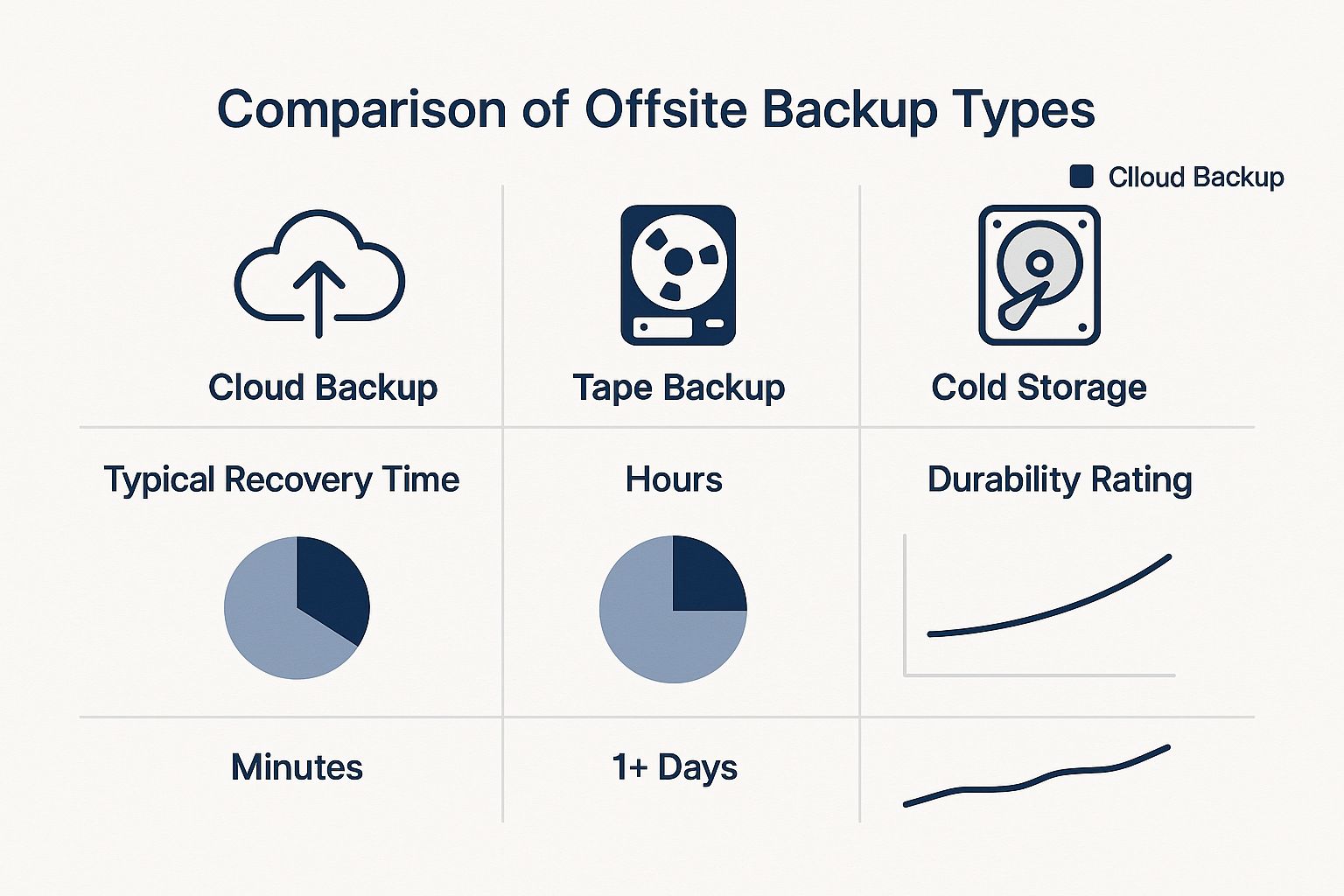
As the data shows, modern cloud solutions strike a fantastic balance between rapid recovery and high durability, easily outperforming older, clunkier methods like tape backups.
So, what's the most effective strategy? Don't choose. Combine them. This hybrid approach aligns perfectly with the industry-standard 3-2-1 backup rule: keep three copies of your data on two different media types, with one copy stored offsite.
Here’s how it works in the real world:
This two-tiered system gives you the speed of local recovery for common problems while guaranteeing complete protection against catastrophic events. Grasping the difference here is a lot like deciding on your core IT infrastructure. You can explore the difference between cloud and on-premise solutions on cloudvara.com to see how these ideas apply on a broader scale.
By integrating both local and remote backups, you create a comprehensive safety net that addresses the full spectrum of data loss risks, ensuring your business can weather any storm.

So, you know why you need an offsite backup. That’s the easy part. The real challenge is telling the difference between a simple file storage service and a genuine business continuity platform. Not all backup solutions are built the same, and the right features can be the difference between a minor hiccup and a full-blown, costly disaster.
When you're looking at options, don't think of it like buying storage space. Think of it like hiring a dedicated security detail for your data. You need a system that's proactive, tough, and completely transparent. The goal is to find a service that just works, humming along in the background so you can have total confidence your data is safe, secure, and ready for a quick restore at a moment's notice.
The biggest point of failure in any backup plan? Human error. It's shockingly easy to forget to run a backup, and even one missed day can mean permanent data loss. That's why the absolute cornerstone of a reliable offsite backup solution is robust automation.
A top-tier service takes the manual work completely off your plate. It should let you set a "fire-and-forget" schedule, running backups automatically at whatever interval you need—daily, hourly, or even continuously. For business continuity, this kind of consistency isn't just nice to have; it's non-negotiable.
Look for these key scheduling abilities:
Done right, automation means your backups are always up-to-date, no babysitting required. You can dive deeper into how to automate backups effectively in our detailed guide on cloudvara.com and really streamline your data protection.
Your backup isn't just a bunch of files; it's a complete replica of your most sensitive business information. That means its security is every bit as critical as your live production data. A premier offsite backup provider will treat security as its absolute top priority, using multiple layers of defense to shield your files from prying eyes.
The gold standard here is end-to-end encryption (E2EE). This process scrambles your data before it even leaves your network, keeps it encrypted during its journey across the internet, and ensures it stays that way on the provider's servers.
With true end-to-end encryption, you hold the one and only decryption key. This means nobody—not even the provider's own staff—can access your files. It’s the highest level of privacy you can get.
Beyond just encryption, look for providers that require multi-factor authentication (MFA) to protect your admin account and operate data centers with intense physical security and industry certifications like SOC 2.
Disasters don't always announce themselves with a flood or a fire. Sometimes the threat is quieter, like a critical file that slowly gets corrupted or a ransomware attack that silently encrypts your data over time. This is where versioning, also known as point-in-time recovery, becomes an absolute lifesaver.
Think of versioning as a time machine for your data. Instead of just saving the most recent copy of a file, the solution keeps multiple historical versions. If you find out a crucial spreadsheet was corrupted last Tuesday, you can simply "roll back" and restore the clean version from Monday. Problem solved.
Just as important is the ability to perform a granular recovery. Sure, you need the option to restore an entire system from scratch, but most of the time you just need to recover a single lost file or folder. A good solution lets you quickly search your backup, pinpoint the exact item you need, and restore it in minutes without downloading your entire dataset. This flexibility is what minimizes downtime during those everyday operational hiccups.
One key feature driving Backup as a Service (BaaS) adoption is its powerful defense against ransomware through immutable storage—a fancy way of saying your backups can't be altered or deleted by attackers. This guarantees you’ll always have clean restore points. The growing pressure to meet compliance rules, like data sovereignty laws requiring data to be stored in a specific country, is also shaping which services businesses choose. This mix of advanced tech and compliance is making BaaS a core part of modern data strategy. You can discover more insights about BaaS adoption on mordorintelligence.com to see how these trends are shaping the industry.
Knowing you need an offsite backup is one thing. Actually putting a plan into action can feel like a huge leap. But it doesn't have to be. By breaking it down into a few logical steps, you can move from theory to reality, building a safety net that protects your business from just about anything.
This isn’t just a tech project; it’s a business strategy. A smart implementation plan makes sure your most valuable digital assets are safe, secure, and—most importantly—ready to be recovered the moment you need them.
Before you can back anything up, you need to know what’s actually worth protecting. That’s why the first step is always a deep dive into your data. Not everything is created equal, and trying to save every last file with the same level of urgency is a quick way to waste money and resources.
Ask yourself a few critical questions to get started:
This audit is the foundation for everything that comes next. Once you have this clarity, you can start putting real numbers to your recovery goals.
With your critical data mapped out, it’s time to define your Recovery Point Objective (RPO) and Recovery Time Objective (RTO). These two metrics are the absolute bedrock of a serious disaster recovery plan, and they’ll guide every decision you make from here on out.
RPO (Recovery Point Objective): This is all about data loss tolerance. It answers the question, "How much data can we afford to lose?" An RPO of one hour means you need backups running at least every 60 minutes.
RTO (Recovery Time Objective): This is about downtime. It answers the question, "How quickly do we need to be back in business?" An RTO of four hours means your critical systems must be restored and running within that window.
Setting these goals forces you to get real about your tolerance for disruption. It’s a crucial exercise that directly impacts how often you run backups and how fast your recovery process needs to be. For a closer look at this process, check out our complete guide on how to create a disaster recovery plan.
Now for the fun part: picking a provider that actually meets your RPO, RTO, and security needs. As you evaluate your options, look for a service that delivers on the automation, encryption, and granular recovery features we’ve talked about. The global market for cloud-based backup is booming—estimated at around USD 5.9 billion and projected to hit USD 27.3 billion by 2035, with a CAGR of 15.3%. Future Market Insights has a great breakdown of this growth. All that growth means you have more competitive, feature-rich options than ever, but it also makes choosing a proven partner even more important.
Once you’ve made your choice, getting set up is usually pretty straightforward:
Here’s the hard truth: a backup plan is just a theory until you prove it works. The final—and most critical—step is to test your restores regularly. It’s the only way to be absolutely certain you can get your data back when disaster strikes.
Don’t just glance at a dashboard that says “complete” and call it a day. A real test involves actually restoring files, folders, or even an entire virtual machine into a sandbox environment. This confirms your backed-up data is corruption-free and that your recovery process can actually meet your RTO.
Make it a habit. Schedule these tests quarterly. It’s the best way to ensure your safety net is ready when you need it most.
As you start looking into offsite backups, a few questions always pop up. Getting the details right is the key to picking a solution that actually protects your business. Let’s clear up some of the most common points of confusion so you can build a truly resilient data strategy.
Answering these questions head-on will give you the confidence to choose, set up, and manage a backup plan that genuinely safeguards your most important digital assets.
This is a big one, and the difference is critical. Think of services like Dropbox or Google Drive as a live, synchronized filing cabinet. They’re fantastic for collaborating and grabbing files from anywhere.
But that real-time syncing can be a double-edged sword. If you accidentally delete a file on your computer, it often vanishes from the cloud, too. Worse, if ransomware encrypts your local files, those corrupted versions will sync right over your clean copies in cloud storage.
An offsite backup solution isn't a live filing cabinet; it’s a time machine for your data. It takes complete snapshots of your system at specific moments and stores them in a separate, secure location.
If your live data gets corrupted on a Tuesday, your cloud storage will probably sync that corrupted version. Your offsite backup, however, lets you ignore the disaster and simply restore the clean, uncorrupted version from your Monday snapshot. This makes it a true disaster recovery tool, not just a file-sharing service.
The 3-2-1 rule is the gold standard in data protection. It’s a simple, memorable framework that’s incredibly effective at making sure your data can survive almost any disaster you can imagine. It’s not a product but a strategy that any solid backup plan should be built on.
Here’s how it breaks down:
Following this rule builds layers of redundancy. It systematically gets rid of single points of failure, making sure that no one event can lead to total, irreversible data loss.
This is probably the most important question you can ask. A reputable offsite backup provider treats security as its absolute top priority, often using safeguards far more advanced than what a typical small or mid-sized business could set up on its own.
Security isn't just one thing; it's a multi-layered approach. It all starts with end-to-end encryption. This powerful process scrambles your data on your system before it ever travels over the internet. Your data stays encrypted while it's in transit and while it’s stored on the provider's servers.
Crucially, you are the only one who holds the decryption key. This means no one—not even an employee at the backup company—can access or read your files.
Beyond encryption, look for these security hallmarks:
Always ask for a provider's security credentials. The safety of your data depends entirely on their diligence.
It’s a valid concern—no one wants their backups to slow down the whole office. The good news is that modern backup solutions are designed to be incredibly efficient. The initial full backup is the only part of the process that uses a lot of bandwidth because it has to transfer your entire dataset.
After that first big transfer, the system gets much smarter. It uses incremental backup technology, which means it only identifies and sends the small blocks of data that have changed since the last backup. This dramatically cuts down the daily load on your internet connection.
For instance, instead of sending a whole 10 GB database every day, the backup might only need to send a few megabytes of new transaction data.
Most professional services also give you tools to manage bandwidth effectively:
A reliable offsite backup solution is a cornerstone of modern business continuity. With Cloudvara, you get the peace of mind that comes with automated daily backups, robust security, and 24×7 support, all tailored to the applications your business depends on. Discover how our dedicated cloud hosting can secure your data and streamline your IT by visiting https://cloudvara.com today.